Build a Moving Average Crossover Strategy in Pine Script

How Do You Build a Moving Average Crossover Strategy in Pine Script?
You compare two moving averages with ta.crossover() and ta.crossunder(), open a trade with strategy.entry() when they cross, and attach a stop and a target with strategy.exit(). Set commission and slippage in the strategy() line so the test is not free. The full script is below.
This guide builds one small strategy you can read in a minute. It is a teaching example, not a trading system. Read it, change it and break it, because that is how you learn what each line does. If you want ready-made code to compare, the strategies in the Pine Script Library hold many crossover scripts written by other people.
What Is a Moving Average Crossover?
A moving average is the average of the last N closing prices, redrawn on every bar. A fast one uses a short N and follows price closely. A slow one uses a long N and moves lazily. A crossover happens when the fast line moves from below the slow line to above it, or the reverse. Traders read an upward cross as a sign that price is starting to rise, and a downward cross as the opposite.
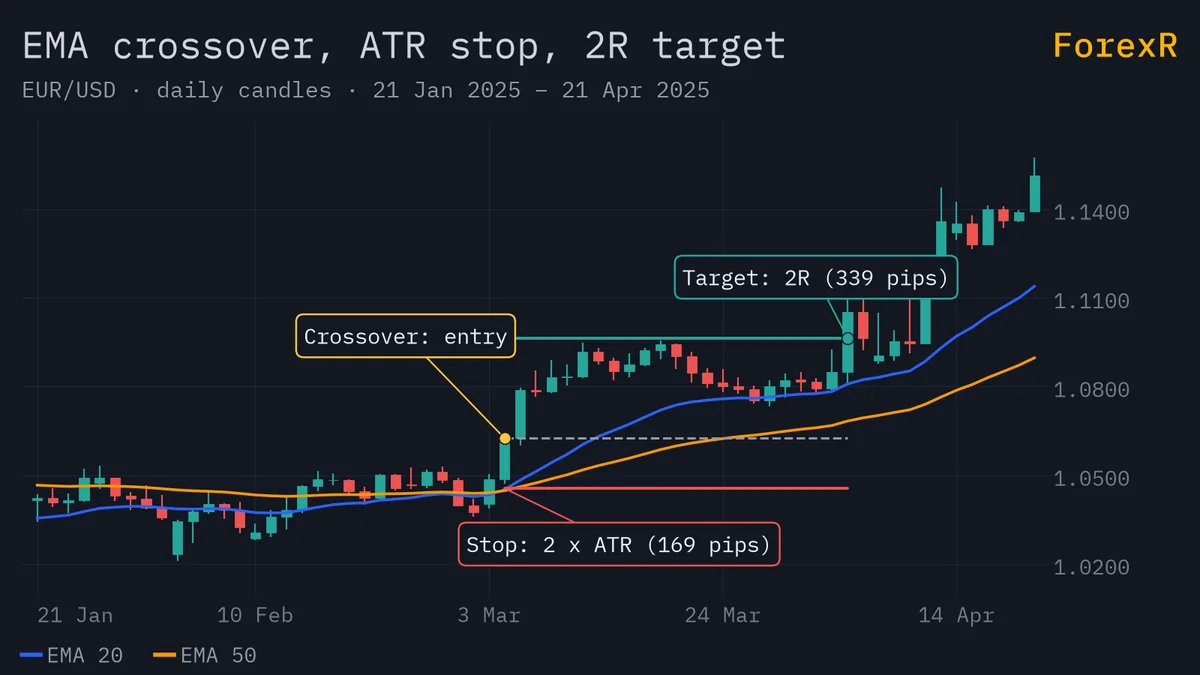
The signal is late by design. Both lines are built from past prices, so by the time they cross, part of the move has already happened. Our guide to moving averages in forex explains the SMA (simple) and EMA (exponential, which weights recent prices more) and when each is used, and the moving average scripts in the Pine Script Library show how others draw them.
The Full Strategy Script
This strategy goes long when the 20-bar EMA crosses above the 50-bar EMA, and short when it crosses below. Every trade gets a stop-loss and a take-profit set from the ATR (average true range, the typical size of a bar).
//@version=6
strategy("EMA Cross ATR Stop", overlay = true, initial_capital = 10000, default_qty_type = strategy.percent_of_equity, default_qty_value = 10, commission_type = strategy.commission.percent, commission_value = 0.05, slippage = 2)
fastLen = input.int(20, "Fast EMA", minval = 1)
slowLen = input.int(50, "Slow EMA", minval = 2)
atrMult = input.float(2.0, "ATR stop multiple", minval = 0.5, step = 0.5)
rr = input.float(2.0, "Reward to risk", minval = 0.5, step = 0.5)
fast = ta.ema(close, fastLen)
slow = ta.ema(close, slowLen)
atrVal = ta.atr(14)
plot(fast, "Fast EMA", color.teal)
plot(slow, "Slow EMA", color.orange)
if ta.crossover(fast, slow)
    strategy.entry("Long", strategy.long)
    strategy.exit("Exit Long", "Long", stop = close - atrMult * atrVal, limit = close + atrMult * rr * atrVal)
if ta.crossunder(fast, slow)
    strategy.entry("Short", strategy.short)
    strategy.exit("Exit Short", "Short", stop = close + atrMult * atrVal, limit = close - atrMult * rr * atrVal)
How Does the Code Work, Line by Line?
strategy(...): declares the script as a strategy. It sets a starting balance of 10,000, a default order size of 10% of equity, a commission of 0.05% and a slippage of 2 ticks.- The four
inputlines: make the two EMA lengths, the stop multiple and the reward ratio adjustable from the settings. See Pine Script inputs for how these appear in the Inputs tab. ta.atr(14): measures the average bar range over 14 bars. Our ATR guide explains why this is a fair yardstick for a stop.ta.crossover(fast, slow): is true only on the bar where the fast line moves from at-or-below the slow line to above it.ta.crossunder()is the reverse.strategy.entry(): opens a market order. If a trade in the other direction is open, TradingView reverses the position, so a short signal closes a long and opens a short.strategy.exit(): sets a stop price and a limit (target) price for the entry named in its second argument.
Here is the arithmetic for one long trade. Say the close is 1.1000 and the ATR is 0.0010 (10 pips). The stop is 1.1000 − 2 × 0.0010 = 1.0980, which is 20 pips away. The target is 1.1000 + 2 × 2 × 0.0010 = 1.1040, which is 40 pips away. The reward is twice the risk, a ratio we cover in risk-reward ratio. Real fills differ a little, because on historical bars TradingView fills a market order at the next bar’s open, not at the close the script saw.
How Do Commission and Slippage Change the Result?
If you do not set commission_* arguments, the strategy applies no commission at all. If you leave slippage out, the default is 0. A backtest with zero costs flatters every strategy, and the effect is biggest on short timeframes where trades are many and small.
commission_typeandcommission_value: herestrategy.commission.percentwith 0.05 means 0.05% of each transaction’s value. Check your own broker’s costs and use those numbers.slippage: a fixed number of ticks (the smallest price step) added against you on every fill. With 2, each order fills two ticks beyond the intended price in the unfavourable direction.
These are guesses, not facts about your account. Spreads (the gap between buy and sell price) widen at news time and in quiet hours, which a fixed number cannot copy. Use the spread cost calculator to see what a spread costs you in money.
What Does the Strategy Tester Show?
Add the script to a chart, and TradingView opens its report with net profit, drawdown, number of trades and a list of every simulated trade. Run it on a few symbols and timeframes and watch how the results jump around. A strategy that makes money on one pair and loses on four others is telling you something. Which numbers matter, and which settings flatter a test, are covered in how to backtest a Pine Script strategy, so this guide does not repeat them.
Why Do Crossovers Lose in Ranges?
Moving averages shine when price trends and fail when it moves sideways. In a range, price drifts up and down around the same level. The fast line keeps crossing the slow line, and each cross gives a new signal that is wrong a moment later. These whipsaws (quick false signals) each cost you a stop-loss plus commission and slippage. A run of small losses can wipe out one good trend trade.
Crossover systems also lose on news spikes, when price jumps past your stop and fills at a worse level. No setting of the two lengths fixes this. Shorter lengths give more signals and more whipsaws. Longer lengths give fewer but later ones. If you tune the lengths until the past looks perfect, you are fitting noise, and the numbers will probably not repeat.
How Can You Add a Trend Filter?
A filter is an extra rule that blocks some signals. A common one is a long EMA, say 200 bars: only buy when price is above it. Replace the long entry from the script like this:
trend = ta.ema(close, 200)
if ta.crossover(fast, slow) and close > trend
    strategy.entry("Long", strategy.long)
The filter removes some losing trades and some winning ones. It will not turn a weak idea into a good one. Test it the same way as the original, and keep the change small. You can also read more on strategy orders, stops and sizing to improve how trades are sized and closed.
Forward Test on a Demo Account First
A backtest uses the past, and you picked the settings after seeing it. Forward testing means running the idea on live prices with no money at risk. Open a demo account, note each signal as it appears and compare your results with the backtest; our guide to the forex demo account shows how to practise properly. Give it enough trades to mean something, and watch for costs the test missed. If you want TradingView to tell you when a cross happens, see Pine Script alerts.
This strategy cannot predict the market and it will lose in ranges. A good backtest does not promise a good future. A script on TradingView cannot place real trades on its own. Leveraged forex and CFD trading carries a high risk of loss, so only risk money you can afford to lose.
FAQ
What are the best moving average lengths for a crossover strategy?
There is no best pair. Common choices such as 20 and 50 or 50 and 200 are habits, not proof. Shorter pairs give more signals and more false ones. Test several pairs on many symbols and periods, and be wary of any setting that looks perfect on only one chart.
Should I use SMA or EMA in a Pine Script crossover?
An EMA gives more weight to recent prices, so it reacts faster and gives earlier but noisier signals. An SMA treats all bars equally and is smoother but slower. Neither is better in general. Change ta.ema to ta.sma in the script and compare the results.
Why does my Pine strategy show no trades?
Check that the chart has enough bars for the slow average to start, that the two lines actually cross in the visible range, and that the strategy was added to the chart without a compile error. Also check the order size: if it is too small or too large for your capital, orders may not be placed.
Can I run this strategy on a live account?
Not directly. A Pine strategy only places simulated orders on TradingView. To act on its signals you would need alerts and extra software, and each link can fail. Test on a demo account first, and treat any live use as an experiment with money you can afford to lose.