Pine Script Strategy Orders: Entries, Stops and Position Size

How Do Orders Work in a Pine Script Strategy?
A Pine strategy places simulated orders with a few commands: strategy.entry() to open or reverse a position, strategy.exit() to set a stop or target, strategy.close() to leave, and strategy.order() for plain orders. By default, an order created on a bar’s close is filled at the next bar’s open. Nothing is sent to a broker.
This guide builds on how Pine Script runs bars and series. If you have not yet built a simple strategy, start with the moving average crossover strategy and come back.
What Is the Difference Between strategy.entry() and strategy.order()?
Both place orders, but they follow different rules, and mixing them up is a common source of surprise trades.
- strategy.entry(): makes a market order by default, and can make limit, stop or stop-limit orders. It respects the pyramiding limit, and it reverses an open position. If you are long 1 and send a short entry of 1, the strategy sells 2 to end up short 1.
- strategy.order(): ignores most of those rules, including pyramiding. It does not reverse; its fills simply net against the open position. Use it when you want to manage the size yourself.
For most beginner strategies, strategy.entry() is the safer choice because the rules protect you from accidental stacking.
How Do You Set a Stop Loss and Take Profit With strategy.exit()?
Give strategy.exit() an exit ID, the entry ID it belongs to, and the levels. Absolute prices use stop for the stop loss and limit for the take profit. Relative distances use loss and profit, measured in ticks. If you give both a stop and a limit, they create two exit orders, and whichever price is reached first is used.
strategy.exit("Trail", "Long", trail_points = 100, trail_offset = 50)
strategy.exit("Bracket", "Long", loss = 100, profit = 200)
The first line is a trailing stop: trail_points is how far in profit it activates, and trail_offset is how far behind price it trails, both in ticks. The second is a bracket of fixed distances. A tick is the smallest price step of the symbol, so the same number means different money on different instruments.
Link the exit to its entry with from_entry (the second argument above). Without it, the exit applies to all open trades. If nothing matches, no exit order is created. Good stop placement itself is a trading question; see stop-loss strategies for the thinking, not just the code.
What Does strategy.close() Do?
strategy.close("Long") closes trades opened with the entry ID “Long”. The ID is the entry’s ID, not an exit order’s ID. One call closes all matching trades in a single market order. strategy.close_all() closes whatever is open and does nothing if there is no position.
Like entries, these orders normally fill on the next bar’s open. The command also has an immediately parameter; set to true, it fills the market order on the same tick as the call.
How Do default_qty_type and default_qty_value Set Position Size?
Set the default order size in the strategy() declaration:
strategy("Demo", overlay = true, default_qty_type = strategy.percent_of_equity, default_qty_value = 2)The three types are strategy.fixed (a fixed number of units), strategy.cash (a fixed amount of money) and strategy.percent_of_equity (a share of your account). TradingView’s documentation shows examples such as strategy.cash with 5000, and strategy.percent_of_equity with 2. Passing qty to an entry overrides the default for that order.
Note what “2% of equity” means here: it is the size of the position, not the amount at risk. A 2% position with no stop can lose far more than 2% of the account if price moves hard against you. For lots and units on real instruments, the position size calculator does the same sum by hand.
How Do You Size a Position From Risk Using ATR?
Risk-based sizing starts from the stop, not from a fixed amount. Worked example: equity is 10,000, you risk 1%, so 100 is at risk. ATR (average true range, the typical bar range) is 5 and your stop is 2 ATR, so the stop sits 10 away from entry. Size = 100 ÷ 10 = 10 units. If the stop is hit, you lose about 10 × 10 = 100. A wider stop gives a smaller size; a tighter stop gives a larger one. The theory is in position sizing.
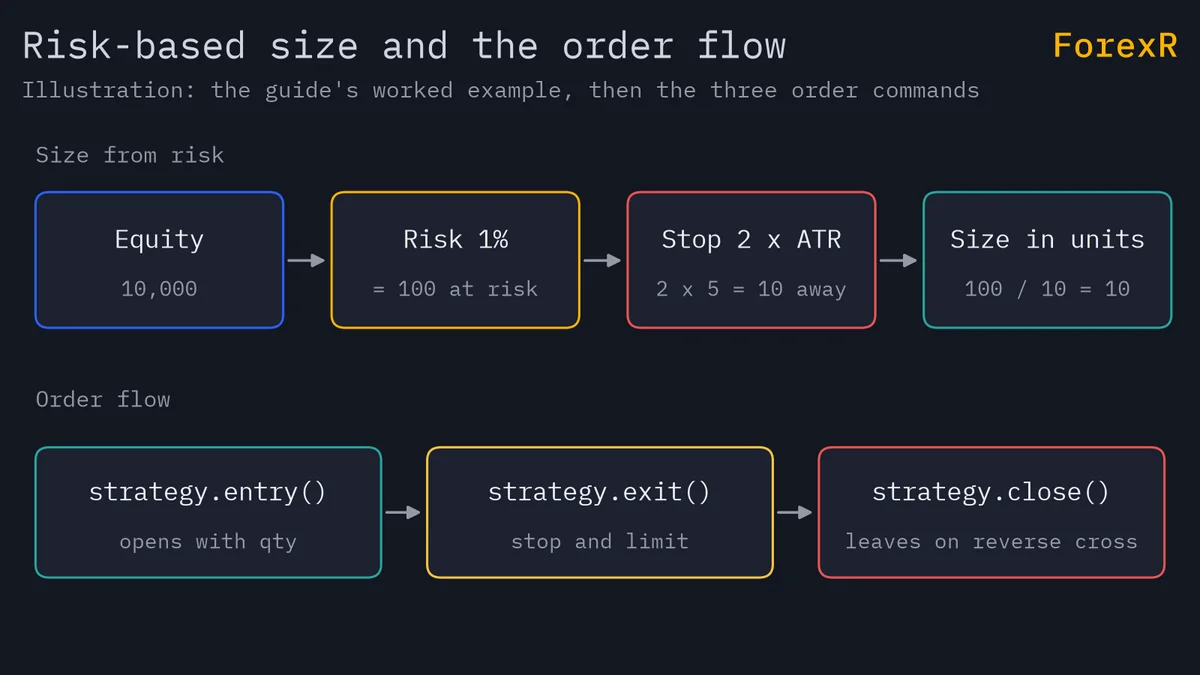
Here is a complete strategy that does that arithmetic in code.
//@version=6
strategy("Risk-sized EMA cross", overlay = true, initial_capital = 10000, default_qty_type = strategy.fixed, default_qty_value = 1, commission_type = strategy.commission.percent, commission_value = 0.02)
riskPct = input.float(1.0, "Risk per trade (% of equity)", minval = 0.1, maxval = 5.0)
atrMult = input.float(2.0, "ATR stop multiple", minval = 0.5)
fast = ta.ema(close, 20)
slow = ta.ema(close, 50)
stopDist = ta.atr(14) * atrMult
qty = math.max(math.floor(strategy.equity * riskPct / 100 / stopDist), 1)
if ta.crossover(fast, slow) and strategy.position_size == 0
    strategy.entry("Long", strategy.long, qty = qty)
    strategy.exit("Exit", "Long", stop = close - stopDist, limit = close + stopDist * 2)
if ta.crossunder(fast, slow)
    strategy.close("Long")
plot(fast, "Fast EMA", color.orange)
plot(slow, "Slow EMA", color.blue)
The qty line is the maths above: equity × risk % ÷ 100 ÷ stop distance, rounded down, at least 1. It buys on a fast-over-slow EMA cross only when flat, places an ATR stop and a limit at twice the stop distance, and closes on the reverse cross. Gaps, slippage and the cost of spread can make real losses larger than the planned 1%, and the units are those of the symbol, so check what one unit means before you trust the result. The strategies in the Pine Script Library show how other authors handle sizing.
What Do pyramiding and process_orders_on_close Change?
- pyramiding: the number of entries allowed in the same direction. The default is 1, so a strategy can open a position but cannot add to it with
strategy.entry(). Raising it lets entries stack, which multiplies risk. The ForexR Pine Script Library raises a Risk Note when a strategy can add several entries in the same direction. - process_orders_on_close: when false (the default), the earliest fill is the next bar’s open. When true, orders created on a bar’s close can fill on that same close. It can make a backtest look quicker than a live trade, which cannot always act at the close.
How Do Capital, Currency and Margin Settings Affect a Backtest?
Initial capital, account currency, order size, leverage, pyramiding, commission and slippage all appear in a strategy’s properties, and you can change them in its Properties tab. Two choices matter most. First, set capital to what you would really trade with, because risk-based sizing scales with it.
Second, margin. margin_long and margin_short in the declaration set the required margin percentage; the default of 100 equals 1:1 leverage. A margin of 25% equals 4:1 leverage. When available funds fall below the requirement, the broker emulator triggers a margin call and sells four times the units needed to cover the loss. Read more in the backtesting guide, and see leverage and margin for the basics.
Why Does a Strategy With No Stop Look So Good in a Backtest?
Without a stop, a losing trade stays open until a reverse signal arrives. In the report, many trades still end positive, because prices often come back, and a few deep floating losses sit hidden between entry and exit. The share of winning trades looks high. The drawdown, which is the biggest fall from a peak, is where the truth lives, so open the report and read it.
The trap is the same one that martingale and grid systems fall into; see martingale and grid strategies. A stop makes the losses visible. It also lowers the share of winners and makes the curve look worse, which is honest. Always check that your strategy does not enter without a stop; ForexR’s Risk Note, “The strategy enters trades without a stop loss”, flags this pattern.
A strategy backtest cannot promise what a live account will do, and fills, costs and gaps are always rougher in real life. Leveraged forex and CFD trading carries a high risk of loss, so test on a demo account and only risk money you can afford to lose.
FAQ
Should I use strategy.entry() or strategy.order()?
Use strategy.entry() for most strategies. It follows the pyramiding limit and reverses positions automatically, which protects you from stacking trades by accident. Use strategy.order() only when you want full control, because it ignores pyramiding and does not reverse; its fills net against the open position.
Why is my strategy.exit() stop not filling at my exact price?
Exit orders are not guaranteed to fill at the price you set. If a bar opens beyond your stop, such as after a gap, the order fills at the first available price. Real trading has the same problem, so a backtest with stops still understates the worst losses.
What is the default order size in a Pine strategy?
The size comes from default_qty_type and default_qty_value in the strategy() call, and a qty argument on an entry overrides it. Types include a fixed number of units, a cash amount and a percent of equity. Check the Properties tab to see the values actually in use.
How do I stop a strategy adding to a losing trade?
Keep pyramiding at its default of 1, which allows one entry in a direction with strategy.entry(). You can also test strategy.position_size == 0 before entering, as in the example above. Be careful with strategy.order(), which ignores the pyramiding limit and can still add to a position.