Repainting in TradingView: How to Spot a Script That Repaints

What Is Repainting in TradingView, and Why Does It Matter?
Repainting is when a script’s plotted signals on past bars differ from what it showed while those bars were forming. TradingView’s documentation defines it as script behaviour that makes historical and realtime calculations or plots behave differently. A signal that appears on the chart today may never have been there at the time, which flatters any test of it.
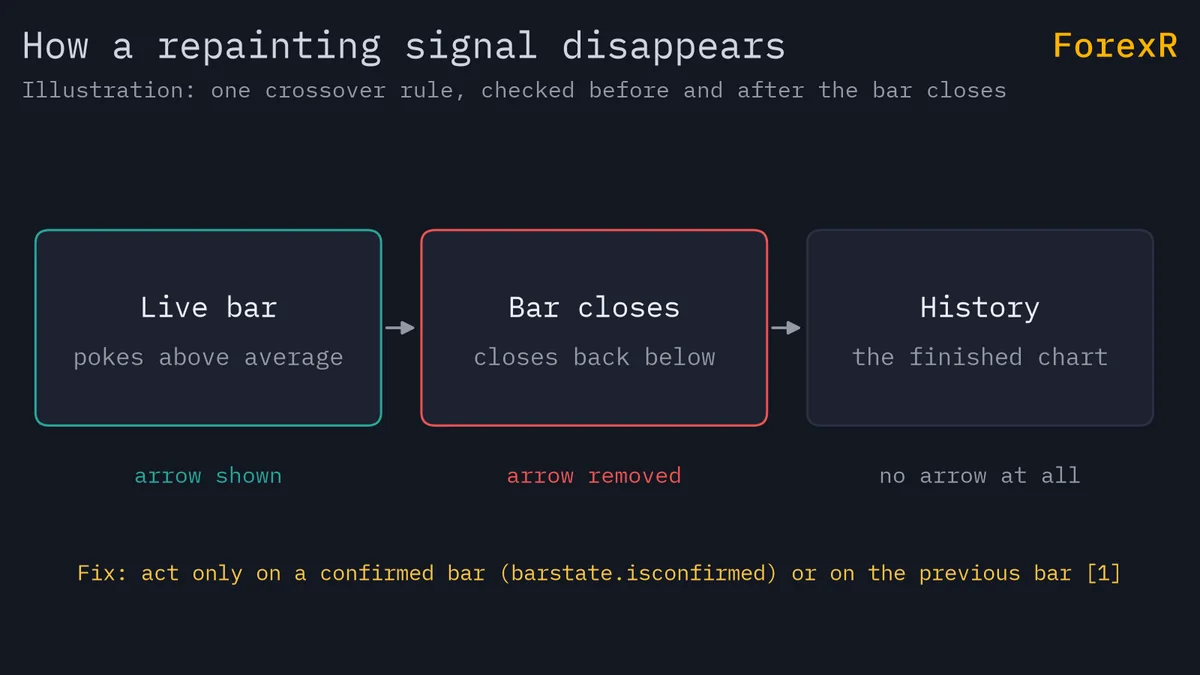
Not all repainting is a defect. A line that moves while the current bar is open is normal and often harmless. The problem is a script that shows clean, early signals on history that you could not have seen live. This guide shows the main causes, how to check for them and how the Pine Script Library flags them.
Why Do Signals Change on the Live Bar?
On a finished (historical) bar, a script sees only four stored numbers: open, high, low and close. On the realtime bar, the one still forming, the high, low and close keep changing until the bar closes. Only the open is fixed.
So a rule such as “price crosses above its moving average” can fire in the middle of a bar, vanish a minute later when price slips back, and be absent from the closed candle. If an arrow is only sometimes there once the bar closes, you are watching an unconfirmed signal. TradingView shows the bar as it stands, so a repainting arrow looks fine until you notice it was never final.
How Does request.security() Cause Repainting?
request.security() asks for data from another symbol or a higher timeframe, such as the daily close on an hourly chart. On historical bars, TradingView gives back only completed higher-timeframe values. On realtime bars it can give back a value that is still forming, and that value may change after you reload the chart.
The lookahead setting adds a second problem. With lookahead=barmerge.lookahead_on and no offset, the history can show the higher-timeframe value before it was known: an hourly bar at 09:00 “knows” that day’s final high. The documentation calls this a future leak, says not to use it, and says that publications using it will be moderated. The result is a backtest that seems to predict the day.
The library tracks this separately, as a lookahead flag for scripts that call request.security() with lookahead on. Lookahead is not always a mistake, because the documented safe pattern uses it, but you should know when a script does.
Why Do Pivots and Zig-Zags Repaint?
A pivot high is a bar whose high is higher than its neighbours. To confirm one, the script must wait for later bars. TradingView’s own example, ta.pivothigh(5, 5), only detects a pivot after 5 more bars have passed. If the script then draws its label back on the pivot bar, 5 bars in the past, the label appears on a bar that was blank when it formed.
That is repainting by plotting in the past. Zig-zags and many swing or structure tools work the same way: their lines are redrawn once the next turning point is known. The honest versions mark the pivot when it is detected, or let you choose. TradingView’s guidance is to default to no offset and make plotting in the past an option.
When you read a chart with such a tool, remember that the swing you see on the left was identified only after price had already moved away from it. See support and resistance for levels that you can judge as they form.
Can Strategies Repaint Too?
Yes. By default a strategy calculates once a bar closes. If it uses calc_on_every_tick=true, it also runs on every realtime update, while history still executes at the close. Orders can therefore fill differently live than in the backtest, and TradingView notes that such backtest results do not represent realtime behaviour.
Variables declared with varip keep their values across realtime updates, something history cannot reproduce. A script that depends on them can be useful live, but its logic cannot be backtested. Other causes the documentation lists include these:
- barstate.isnew: true at the close of historical bars but at the open of a realtime bar, so it behaves differently.
- timenow: returns the current time, so it cannot behave the same on history and live.
- Data revisions: exchanges or data providers can revise prices after a bar closes.
- Starting point: where the chart’s history begins can change results, since indicators like moving averages carry earlier values forward.
How to Check a Script for Repainting
- Watch it live: leave it on a chart for a few bars, with a short timeframe. Note any arrow that disappears or moves before the bar closes.
- Use Bar replay: press the Bar replay button, pick a starting bar and press Play to step forward. Indicators process the replayed data bar by bar, so compare what appears with what the full history shows. Treat it as a hint, not proof.
- Search the code: look for lookahead = barmerge.lookahead_on, a request.security() call, ta.pivothigh or ta.pivotlow, calc_on_every_tick, varip and barstate.isconfirmed. On the library page you can open or copy the source.
- Compare reload results: reload the chart and see if the signals changed.
- Check the library flags: look for the Repaints badge before you copy the script.
You do not need to read code for the first two steps, so start there. Test on a demo account before relying on any signal.
How to Avoid Repainting
TradingView documents several fixes for a crossover signal. Each fires later than the repainting version, which is the cost of being reliable:
- Confirm on close: add and barstate.isconfirmed to the condition, so it only passes on the last calculation of the bar.
- Use the previous bar: read the signal one bar back with [1], or build the signal from close[1].
- Use the open: the open does not change, so compare it with the previous bar’s average value.
For higher-timeframe data, the documented non-repainting pattern is request.security(syminfo.tickerid, higherTimeframe, close[1], lookahead = barmerge.lookahead_on). The documentation says you cannot drop either half: the [1] offset takes the last completed higher-timeframe bar and lookahead_on stops the realtime bar returning an unfinished value. For pivots, avoid shifting the plot back unless you choose to.
The price of a repaint-free script is delay. Signals arrive a bar late, but they are the same on history and live, so your backtest means more. Our multi-timeframe analysis guide covers using higher timeframes sensibly.
How Does ForexR Flag Repainting?
The library computes four risk flags for each script: repaints, lookahead, pyramiding and no_stop_loss. A repainting script shows a “Repaints” badge on its card and on its page, and the Risk Notes row in the Details table reads, for example, “Signals can change on the live bar or after it closes (repainting)”. The Refine filter has a “Hide repainting” toggle.
At the time of writing, the toggle leaves 9,507 of 10,850 scripts. Two cautions apply. The flags come from automatic analysis of the code, so they can miss a case or flag a harmless one, and no badge does not prove a script is clean. The page also says ForexR did not write, test or endorse the script. Use the badge to decide what to read first, then check yourself. Browse the strategies with the toggle on.
Why Does Repainting Make Backtests Look Better Than Reality?
A backtest replays history. If the history shows signals that were only knowable afterwards, such as a confirmed pivot or a higher-timeframe close, the strategy buys the low and sells the high with perfect timing. A real trader would have seen the signal late, or not at all.
This is why strategy results need a sceptical read. Compare them with a paper-trading period on a demo account, and use realistic costs; how to backtest a Pine strategy covers the settings. The ideas also apply to MetaTrader testing, as in how to backtest an EA, and are one reason to size trades with care, as in risk management.
Treat any smooth equity curve from a repainting script as unproven. CFDs and leveraged trading carry a high risk of losing money, so use a demo account first and only risk money you can afford to lose.
FAQ
How do I know if a TradingView indicator repaints?
Watch it on a live chart and see whether signals appear, move or disappear before the bar closes. Use Bar replay to step through bars, and read the code for request.security() with lookahead on, pivot functions and calc_on_every_tick. On ForexR, a Repaints badge marks scripts flagged automatically.
Does a signal that appears only after the candle closes repaint?
No. A signal confirmed at the close, for example with barstate.isconfirmed, does not change afterwards, so history and live trading match. It does arrive later than a signal on the live bar, which is the trade-off for being reliable.
Is lookahead_on always bad in Pine Script?
No. TradingView’s documented non-repainting pattern for higher-timeframe data uses lookahead_on together with a [1] offset. Lookahead on without that offset shows future values on history and is called a future leak. So the setting matters less than how the whole call is written.
Can a strategy repaint and still show a good backtest?
Yes, and that is the danger. If history uses information that was not known at the time, the backtest can look unrealistically good while live results differ. Check for the causes above, use realistic costs and forward test on a demo account before trusting the curve.