Pine Script request.security(): Multi-Timeframe Done Safely

How Does request.security() Work for Multi-Timeframe Pine Script?
request.security() lets a script on one chart read data from another timeframe or symbol, such as the daily close while you look at a 15-minute chart. You give it a symbol, a timeframe and an expression, and it returns that expression calculated in that other context. Used carelessly, it shows the future.
That risk is why this guide exists. Repainting is covered in its own guide; here you learn the arguments, the one safe pattern, and the limits. If you want the trading idea behind it first, read about multi-timeframe analysis.
What Are the Arguments of request.security()?
The signature in Pine Script v6 is request.security(symbol, timeframe, expression, gaps, lookahead, ignore_invalid_symbol, currency, calc_bars_count). The first three do most of the work.
- symbol: a ticker ID. Use
syminfo.tickeridfor the chart’s own symbol. An empty string also means the chart’s symbol. - timeframe: a text value such as
"60"for one hour,"240"for four hours or"D"for one day. Usetimeframe.periodor an empty string for the chart’s own timeframe. - expression: what to calculate over there. It can be a plain value like
closeor a calculation liketa.ema(close, 20). - gaps: how to fill the chart bars between higher-timeframe bars. Covered below.
- lookahead: whether the data may come from after the current bar. Covered below, and it matters most.
- ignore_invalid_symbol: if
true, a bad symbol returnsna(no value) instead of stopping the script with an error.
The script pays attention to the expression you pass. Pass the calculation itself, as in ta.ema(close, 20), so it runs on the higher timeframe’s own bars. An EMA of 20 on the daily chart is not the same as an EMA of 20 on the hourly chart, and that is the point.
How Do You Plot a Higher-Timeframe Moving Average?
Here is a complete indicator. It lets you pick the higher timeframe with input.timeframe (see Pine Script inputs), draws the live value in orange and the confirmed value in blue.
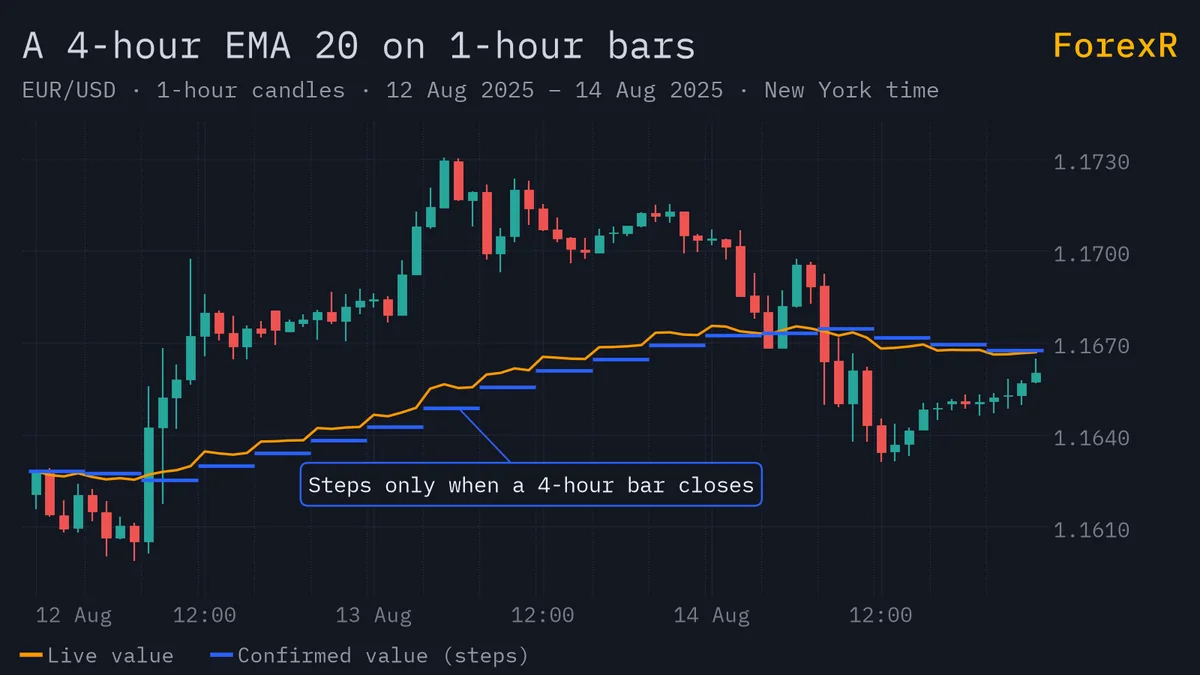
//@version=6
indicator("HTF Moving Average", overlay = true)
tf = input.timeframe("240", "Higher timeframe")
len = input.int(20, "Length", minval = 1)
if timeframe.in_seconds() > timeframe.in_seconds(tf)
    runtime.error("Pick a timeframe at or above the chart's timeframe.")
live = request.security(syminfo.tickerid, tf, ta.ema(close, len))
confirmed = request.security(syminfo.tickerid, tf, ta.ema(close, len)[1], lookahead = barmerge.lookahead_on)
plot(live, "Live higher-timeframe EMA", color.orange)
plot(confirmed, "Confirmed higher-timeframe EMA", color.blue, 2)
Put it on a 15-minute chart with the timeframe set to 240. The if block stops the script with a clear message when you choose a timeframe lower than the chart’s, because this simple pattern is built for higher timeframes. If you want a similar tool without writing one, browse the moving-average scripts in the ForexR Pine Script Library; many of them offer a higher-timeframe option.
What Does lookahead Do, and Why Is lookahead_on Dangerous?
Lookahead controls whether the data may come from beyond the bar being drawn. In v6 the default is barmerge.lookahead_off. Compare three requests for the high of a higher timeframe:
float lookaheadOff = request.security(syminfo.tickerid, tf, high)
float lookaheadOn = request.security(syminfo.tickerid, tf, high, lookahead = barmerge.lookahead_on)
float safe = request.security(syminfo.tickerid, tf, high[1], lookahead = barmerge.lookahead_on)
The first is the default. The second, lookahead_on with no offset, leaks future data into history. Picture an hourly chart and a daily request. At 09:00 the second line already holds that day’s final high, which nobody knew at 09:00. The third line adds [1], an offset that asks for the previous higher-timeframe bar, so it only ever holds a finished value.
TradingView’s documentation calls the combination of [1] and lookahead_on the way to always use the last confirmed value from the higher timeframe. The offset is required. lookahead_on without it is the classic mistake behind backtests that look like magic.
How Do You Get a Confirmed Higher-Timeframe Value?
Use the pattern from the script above: put [1] after the expression and set lookahead = barmerge.lookahead_on. Three things follow.
- The value is one bar old. On a daily request you see yesterday’s finished figure all through today. That lag is the price of an honest signal.
- History and live match. Because the number is already final, it does not change when the higher-timeframe bar closes, so the chart you see after a reload looks like the chart you saw live.
- You trade on what you could have known. That is what a fair backtest of a Pine strategy needs.
If you do want the live, still-forming value, leave lookahead off. Just remember that on the latest bar it keeps moving until the higher-timeframe bar closes, so a rule that depends on it can flip while the bar is open.
What Do Gaps Do in request.security()?
A higher timeframe has fewer bars than your chart, so most chart bars have no new higher-timeframe bar of their own. The gaps argument decides what to show on those bars.
float filled = request.security(syminfo.tickerid, "60", close, gaps = barmerge.gaps_off)
float gappy = request.security(syminfo.tickerid, "60", close, gaps = barmerge.gaps_on)- gaps_off (the default): each chart bar repeats the last confirmed higher-timeframe value, so the line is continuous.
- gaps_on: the value is
nabetween higher-timeframe bars and only appears when a new one confirms. Lines drawn from it look broken, but it is useful when you want a signal only on the bar where the higher timeframe changed.
For a moving average you will almost always keep the default. Gaps are a display choice, not a fix for lookahead: they do not remove the future leak.
What Can request.security() Not Do?
It is not a free pass to better data, and it has limits worth knowing before you build on it.
- It cannot predict. It reads data from another timeframe; it knows nothing the market has not already printed.
- Request count is capped. A script may make up to 40 unique
request.*()calls, and a higher cap exists on the top paid plan. Identical calls reuse the same data and generally do not count twice. - Dynamic requests are on by default in v6. That means
request.*()calls can sit insideifblocks and loops, and the timeframe can be a series value. You can switch this off withdynamic_requests = falsein the declaration. With it off, only the expression may be a series, and a series timeframe gives a compile error. - Lower timeframes are different. Asking for a timeframe below the chart’s returns intrabar data and needs another approach; this guide covers higher timeframes only.
- Realtime is limited. With dynamic requests, every context must be requested on historical bars first. A new context cannot first appear on a live bar.
Is request.security() Slow, and How Do You Keep It Light?
Each request asks TradingView to calculate your expression on another set of bars, so more requests mean more work. Keep it light with a few habits.
- Request once, reuse many times. Store the result in a variable and use that variable, instead of repeating the same call.
- Request tuples. If you need several values from one context, you can return them together in one call. The combined size of all tuples is limited to 127 elements.
- Do the calculation over there. Pass
ta.ema(close, len)as the expression, not a function you wrapped around the result. - Test on a short range. If the script feels slow, shorten the chart range first. Other limits are listed in Pine Script errors and limits.
How Do You Check That Your Script Is Honest?
Scan the code for lookahead_on. If it is there, make sure a [1] sits on the expression. Then reload the chart and compare history with what you saw live. If signals changed, something leaked. Remember too that a script runs differently on historical and live bars; how Pine Script runs bars and series explains why.
You can also hunt through open-source code. The ForexR Pine Script Library adds a Risk Note, “Reads higher-timeframe data with lookahead on, so the history can show signals that were not there in real time”, when it finds that pattern. That note is automatic, it is not a verdict, and it can be raised for the safe pattern too, so read the line yourself. Trend tools in the Trend category are a good place to practise this check.
A higher-timeframe filter can only describe the past. It will not stop a range from chopping up a trend rule, and it cannot see news before it prints. Leveraged forex and CFD trading carries a high risk of loss, so test on a demo account and only risk money you can afford to lose.
FAQ
What is the difference between lookahead_on and lookahead_off?
With lookahead_off, the default in v6, a bar sees only data that existed by that bar. With lookahead_on and no offset, history can receive the higher-timeframe bar’s final value before it was known, which flatters a backtest. Adding [1] to the expression and then using lookahead_on gives the last confirmed value safely.
Can I use request.security() to get data from a lower timeframe?
It can return lower-timeframe data, but the result is not one value per chart bar. The function then selects an intrabar value, so the common higher-timeframe pattern does not apply. Treat it as a separate technique with its own limits, and use a higher timeframe first while you are learning.
Why does my higher-timeframe line look like steps?
A higher-timeframe value changes only when a new higher-timeframe bar forms, so the chart repeats the same number across many smaller bars. That step shape is correct. With gaps_off the line stays continuous, and with gaps_on the line breaks into dots between updates.
How many request.security() calls can one script make?
TradingView documents up to 40 unique request calls per script, with a higher limit on the top paid plan. Identical calls reuse data and generally do not count again. If you hit the limit, combine values into one call with a tuple, or remove requests you do not need.
Free Multi-timeframe Scripts for TradingView
Open-source Pine scripts from the ForexR library that build on this indicator. Copy one into TradingView's Pine Editor to try it on your own chart.
Free Screener and Dashboard Pine Scripts · How to add a script to TradingView