Pine Script Sessions and Time: Shade London, New York, Asia

How Do You Shade a Trading Session in Pine Script?
Test each bar with time() and a session string such as “0800-1630”. The function returns a timestamp when the bar opens inside the session and na (no value) when it does not. Turn that test into true or false, then pass it to bgcolor() to colour the chart background. A full script is below.
Sessions matter in forex because activity and spreads change through the day; our guide to forex trading sessions explains the hours and why. This guide shows how to mark them on a TradingView chart. Many ready-made versions sit in the sessions and time category of the Pine Script Library, and how to add a Pine Script to TradingView shows how to put one on your chart.
What Is a Session String?
A session string is a short piece of text that describes a time window. The format is "HHmm-HHmm" on the 24-hour clock, so "0800-1600" means 8:00 to 16:00. You can list several windows with commas, such as "0800-0900,1230-1630". You can also add days after a colon, where 1 is Sunday and 7 is Saturday: "0930-1700:23456" means Monday to Friday. If you leave the days out, the window applies every day. A zero is not a valid day.
You can read more about the first steps of writing a script in Pine Script basics, which this guide assumes you have seen.
How Does time() Tell You a Bar Is Inside a Session?
The call looks like time(timeframe.period, session, timezone). The first argument says which timeframe to test; timeframe.period means the chart’s own. The second is the session string. The third, optional, is the time zone the session is written in. For a bar that opens inside the session you get its opening time as a number. Outside it you get na. So not na(time(...)) is a true/false answer to “is this bar in the session?”.
Use an intraday chart, such as 15 minutes or 1 hour. A daily bar covers the whole day, so it cannot tell you which hours price was moving in.
The Full Script: Shade Tokyo, London and New York
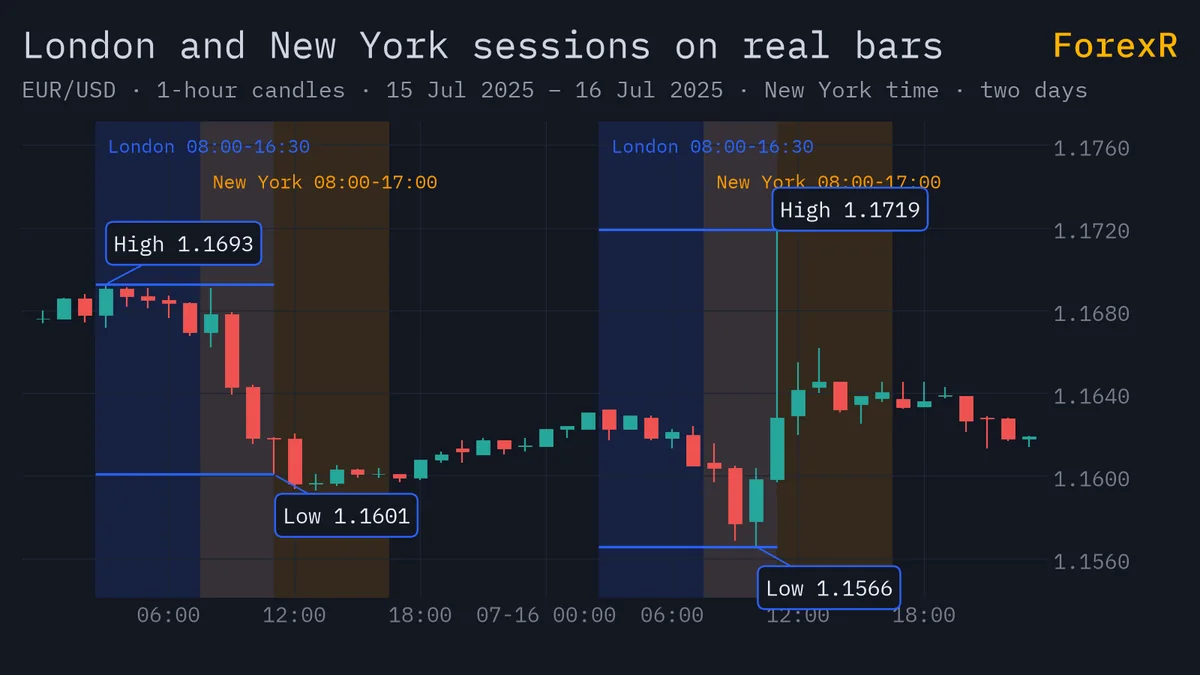
This indicator uses one input per session, tests each in its own local time zone, shades the three sessions in different colours and draws the London session’s high and low.
//@version=6
indicator("Forex Session Shading", overlay = true)
asiaIn = input.session("0900-1500", "Tokyo session")
londonIn = input.session("0800-1630", "London session")
nyIn = input.session("0800-1700", "New York session")
inAsia = not na(time(timeframe.period, asiaIn, "Asia/Tokyo"))
inLondon = not na(time(timeframe.period, londonIn, "Europe/London"))
inNY = not na(time(timeframe.period, nyIn, "America/New_York"))
bgcolor(inAsia ? color.new(color.blue, 90) : na)
bgcolor(inLondon ? color.new(color.green, 90) : na)
bgcolor(inNY ? color.new(color.orange, 90) : na)
var float lonHigh = na
var float lonLow = na
if inLondon and not inLondon[1]
    lonHigh := high
    lonLow := low
else if inLondon
    lonHigh := math.max(lonHigh, high)
    lonLow := math.min(lonLow, low)
plot(inLondon ? lonHigh : na, "London high", color.green, style = plot.style_linebr)
plot(inLondon ? lonLow : na, "London low", color.red, style = plot.style_linebr)
The session hours here are examples. Many traders define them differently, so change the inputs to match your own plan. The three bgcolor() calls use color.new(color, 90) to make a colour 90% transparent, so candles stay readable. Where sessions overlap, such as London and New York in the afternoon, the shades stack.
How Do You Track a Session’s High and Low?
You need memory from bar to bar. A variable declared with var keeps its value from one bar to the next instead of resetting each time (our guide on how Pine Script runs bar by bar explains why). In the script, lonHigh and lonLow are set to the first bar’s high and low when London opens, which the test inLondon and not inLondon[1] detects. The [1] reads the value one bar back. On every later bar of the session, math.max() and math.min() widen the range if price breaks out of it.
The plots show the values only while the session runs. plot.style_linebr leaves a gap between days instead of joining yesterday’s line to today’s. Note that the high and low keep growing until the session ends, so on a live bar they can still change.
How Do You Draw a Box for the London Open Range?
An open range is the high and low of the first part of a session; a breakout trader waits for price to leave it. Our London breakout strategy guide covers the idea and its testing. To draw the range as a box, add these lines to the end of the script above:
var box rangeBox = na
if inLondon and not inLondon[1]
    rangeBox := box.new(bar_index, high, bar_index, low, border_color = color.green, bgcolor = color.new(color.green, 85))
else if inLondon
    box.set_right(rangeBox, bar_index)
    box.set_top(rangeBox, lonHigh)
    box.set_bottom(rangeBox, lonLow)
When London opens, a new box is made with box.new(). On each later bar of the session, the code stretches its right edge to the current bar and moves its top and bottom to the running high and low. Drawings like boxes have their own rules, which a later guide in this track covers. If you would rather start from finished code, browse the Pine Script Library for session range scripts.
Which Time Zone Does Pine Script Use?
Every symbol has an exchange time zone, held in syminfo.timezone. Calendar values such as hour and dayofweek, and the session test in time(), use it unless you pass a timezone argument. The time zone you pick for the chart’s display is a different thing: it only changes how the clock is drawn. TradingView’s documentation says it does not affect Pine scripts, because scripts cannot see it.
This is a common surprise. You set your chart to your own city’s time, type “0800-1600” and the shading lands at the wrong hours, because the string was read in the exchange’s time zone. Always pass the time zone you mean, as the script does. The time() function’s timezone argument sets the zone of the session string; it does not change the timestamp it returns.
What Goes Wrong With Daylight Saving Time?
Time zone names come in two forms. A fixed offset, such as "UTC-4", never changes. An IANA name, such as "America/New_York" or "Europe/London", follows the local clock and shifts by an hour when daylight saving time (DST) starts or ends. TradingView recommends the IANA form for most cases. The reason is simple: “UTC-4” is right for New York only in summer, and wrong in winter, when New York is UTC-5.
- Use IANA names when a session follows a local market clock, like the London or New York open.
- Expect the UTC shift. New York and London change their clocks on different dates, so for a few weeks the gap between the two sessions in UTC is an hour off its usual size.
- Tokyo has no DST, so its session stays fixed in UTC.
- Avoid sessions that cross midnight until you have tested them, because the start and end fall on different dates.
- Check the chart. Scroll to a spring and an autumn date and confirm the shading still lines up with the real opens.
Our market hours tool is a quick way to check when each market is open, and best time to trade forex puts the hours in context.
How Do You Let Users Edit the Session Times?
Use input.session(), as the script does. It takes a session string as its default, and the user changes the times in the script’s Inputs tab. They can edit the hours but not the days of the week. If you want weekday-only sessions, write the days into the default string yourself. For the other input types, read Pine Script inputs.
A session shading script only describes where the clock is. It cannot tell you whether a breakout will hold, and a range drawn from past bars says nothing certain about the next one. Leveraged forex and CFD trading carries a high risk of loss, so only risk money you can afford to lose.
FAQ
Why is my Pine Script session shading in the wrong hours?
Most often the session string is being read in a different time zone from the one you expect. By default time() uses the symbol’s exchange time zone, and your chart’s display time zone does not change that. Pass a timezone argument such as Europe/London, and check on an intraday chart.
Can I shade only weekdays in Pine Script?
Yes. Add the days after a colon in the session string, using digits where 1 is Sunday and 7 is Saturday. For example, 0800-1630:23456 covers Monday to Friday. Note that input.session lets users edit the hours but not the days, so set the days in the default.
What does na mean in the time() function?
The value na means not available, or no value. When you call time() with a session string, it returns na for bars that open outside the session. Testing not na(time(...)) therefore gives you true inside the session and false outside it, which you can feed into bgcolor().
Does a Pine session indicator work on a daily chart?
Not usefully. A daily bar covers the whole day, so it cannot show which hours were active. Session shading and session ranges are meant for intraday charts, such as 5-minute, 15-minute or 1-hour. Switch to a lower timeframe than daily and the shading appears.
Free Trading Sessions Scripts for TradingView
Open-source Pine scripts from the ForexR library that build on this indicator. Copy one into TradingView's Pine Editor to try it on your own chart.
Free Session and Time Pine Scripts · How to add a script to TradingView