How to Read a Pine Script Before You Trust It: A Checklist

How Do You Read a Pine Script Before You Trust It?
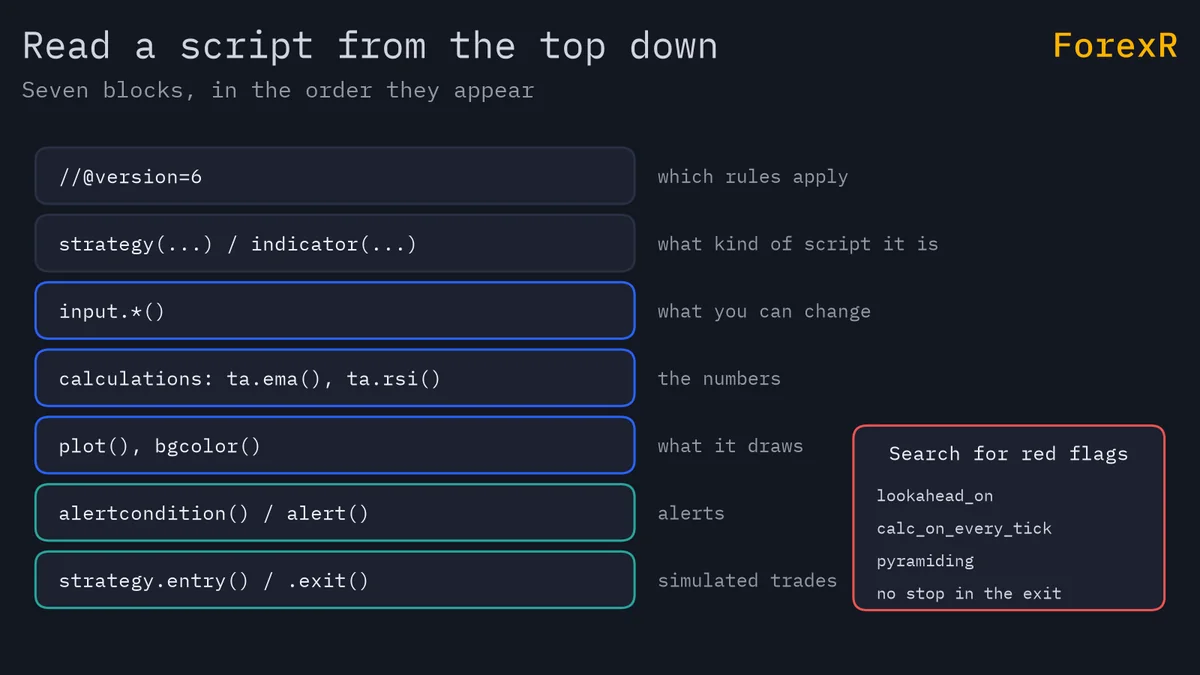
Read it from the top in five passes: the version and declaration lines, the inputs, the calculations, the plots and alerts, and, for a strategy, the order calls. Then search the file for a short list of warning words. You do not need to understand every line to spot most of the problems.
This is a routine, not a guarantee. Reading tells you what a script does, never whether it makes money. Before you start, get the code from a Pine Script Library page or from the library guide’s copy steps, and paste it into the Pine Editor as you would to add it to a chart.
Step 1: What Do the Version and Declaration Lines Say?
Look at the first lines. The //@version= line tells you which edition of Pine the author wrote. The declaration, indicator(), strategy() or library(), tells you what kind of script it is, and that decides what to check next. An indicator can only draw and alert. A strategy places simulated trades and has a long list of settings that change its results.
Strategy settings sit inside the strategy() call, for example pyramiding, which allows several entries in one direction. Look for any arguments you do not recognise. If you are unsure about the three script kinds, Pine Script indicators, strategies and libraries sets them side by side.
Step 2: What Do the Inputs Control?
Find the input.*() calls, usually near the top. Each one is a setting you can change. Note the defaults and ask whether they are sensible: a length of 14 is ordinary, a length of 377 is not. Pine Script inputs explains the arguments. The library page’s Settings table lists the same inputs with their titles, types and defaults, so you can read them before opening the code.
Numbers that are not inputs matter too. A value typed straight into a formula, such as ta.highest(high, 500), is a hidden lookback, a fixed number of past bars the script depends on. You cannot change it from the settings window, and it may need more history than your chart has.
Step 3: Where Do the Calculations Happen?
The middle of the script is where values are worked out. Read it as a list of small facts: a moving average, a difference, a true-or-false condition. Give each variable a plain-English meaning in the margin. Look for these as you go:
ta.functions: built-in indicator maths, such asta.rsiandta.atr. These are standard.request.security: data from another timeframe or symbol. Check itslookaheadargument.- Dates and prices: a fixed price level or a
timestamp()date inside the logic. The script may only suit one period. - Offsets such as
[1]: a value from one bar back. This is common and often a good sign, because it uses only confirmed bars.
If a variable name is unclear, trace it upward to the line where it is first set. That one habit answers most questions.
Step 4: What Gets Plotted, Shaded or Alerted?
Go to the bottom and see what the script shows you. plot() draws lines, plotshape() draws symbols, bgcolor() shades the background, and alertcondition() or alert() creates alerts. Match each one to a condition above it. If an arrow is drawn when a and b is true, check what a and b are, and whether either looks forward in time.
Check also what is not shown. Some scripts calculate a lot and plot only a summary, which makes it hard to see what drives a signal. A signal you cannot trace is a signal you should not trust.
Step 5: What Do the Strategy Calls Show?
In a strategy, find strategy.entry, strategy.exit, strategy.close and strategy.order. Entries show when it opens trades. Exits show how it leaves them. If you can find entries but no strategy.exit with a stop, the strategy may only close when an opposite signal arrives, and a bad trade can run a long way. Also check the commission and slippage settings in the strategy() call. If they are zero or missing, the backtest ignores trading costs. How to backtest a Pine strategy explains why that flatters results.
Which Red Flags Should You Search For?
Use the editor’s find box (Ctrl+F, or Cmd+F on a Mac) and search for each word below. The last column shows the matching note that the library writes on its pages.
| Search for | What it can mean | ForexR Risk Note |
|---|---|---|
lookahead | Higher-timeframe data may show values before they were known | Reads higher-timeframe data with lookahead on |
calc_on_every_tick | The strategy runs on every live update, not only at the close | Signals can change on the live bar (repainting) |
pyramiding | The strategy may add entries in the same direction | Can add several entries in the same direction |
strategy.exit | Missing or without a stop, trades have no planned loss limit | Enters trades without a stop loss |
timestamp( | A fixed date, so results may depend on one chosen period | None; read the code |
A match is a reason to read more closely, not proof of a fault. TradingView’s documentation describes a safe pattern for higher-timeframe data that does use lookahead, with a one-bar offset, so context matters. Repainting in TradingView explains the mechanics, and this guide does not repeat them.
How Do the ForexR Risk Notes Map to the Code?
On each script page, the Details table has a Risk Notes row. ForexR computes it automatically from the code and README, looking for repainting, lookahead, stacked entries and missing stops. When it finds nothing, the page says that no repainting, lookahead or stacked entries were found and that this says nothing about how well the script works. The notes are a shortcut to the lines in the table above, so use them to decide where to look first. Because they are automatic, they can miss things. The strategy scripts are where they matter most.
Two other places to read: the Settings table, which shows inputs without opening the code, and the licence header at the top of many files. A licence comment such as MIT, GPL or the Mozilla Public License 2.0 says what you may do with the code. Keep it and the author’s credit lines intact if you copy or edit the script.
A Worked Example: Reading a Short Strategy
Here is a small strategy built to contain flags. It compiles, but it is a teaching sample, not a recommended system. Read it with the five steps.
//@version=6
strategy("Red Flags Demo", overlay = true, pyramiding = 5, calc_on_every_tick = true)

// Daily close, requested with lookahead on and no offset
dayClose = request.security(syminfo.tickerid, "D", close, lookahead = barmerge.lookahead_on)
fastEma = ta.ema(close, 9)

if ta.crossover(fastEma, dayClose)
    strategy.entry("Long", strategy.long)
if ta.crossunder(fastEma, dayClose)
    strategy.close("Long")

plot(dayClose, "Daily close")
Line 1 says version 6 and line 2 declares a strategy, so it places simulated trades. Inside the declaration are two flags: pyramiding = 5 allows up to five entries in one direction, and calc_on_every_tick = true makes it run on every live update. Line 5 asks for the daily close with lookahead on and no offset, so on history each intraday bar can see that day’s final close. That is a future leak, and it makes the backtest look better than live trading could be. There is no strategy.exit, so no stop. Each flag is visible in a few seconds, once you know what to search for.
What Can Reading Not Tell You?
A clean read does not mean a script is profitable. Code can be honest and still lose money, because markets change and indicators describe the past. Reading also cannot reveal how a script behaves in a range or around news. Test it on a chart, watch it forward on a demo account, and size your risk with risk management rules. If you want to change anything, how to edit a Pine Script is the next step.
Leveraged forex and CFD trading carries a high risk of losing money quickly. A script cannot protect you from that, so only risk money you can afford to lose.
FAQ
How can I tell what a Pine Script does without running it?
Read the declaration to learn whether it is an indicator or a strategy, then the input calls for its settings, and finally the plot, alert and strategy calls for its output. Searching for words such as lookahead, pyramiding and calc_on_every_tick shows the riskiest choices quickly. Running it on a chart is still the best final check.
Is it safe to paste a Pine Script I found online?
Pine runs on TradingView’s servers and cannot take money from your broker account, so the risk is mainly to your decisions, not your funds. Scripts can still mislead through repainting or flattering backtests. Read the code, check the licence and test the script on a demo account before you rely on it.
What does lookahead mean in a Pine Script?
Lookahead is a setting on request.security(). With lookahead on and no one-bar offset, a lower-timeframe bar can see a higher-timeframe value before that value was final. History then shows information you could not have had live. TradingView documents a safe pattern that combines lookahead with an offset, so check how the call is written.
Do I need to know programming to read a Pine Script?
No. Most of a script is names and function calls that read like short sentences. Start with the top and bottom of the file, then fill in the middle. You can spot most red flags just by searching for a few words, even before you understand the maths.