Pine Script vs MQL5: TradingView or MetaTrader for Trading?

Should You Learn Pine Script or MQL5?
Learn Pine Script if you want to build chart tools and test ideas on TradingView. Learn MQL5 if you want an Expert Advisor (EA), a program that trades inside MetaTrader 5 and sends orders to your broker. Pine is quicker to start and lives in the browser. MQL5 is longer to learn but can run the whole trade loop.
Many traders end up using both: Pine to look at ideas, MetaTrader to run them. This guide compares the two honestly, so you can choose without wasting weeks.
What Are Pine Script and MQL5?
Pine Script is the language of TradingView, a charting website. Scripts run on TradingView’s servers and draw on a chart. What Is Pine Script? covers it in full.
MQL5 is the language of MetaTrader 5 (MT5), the trading platform many forex brokers offer. MetaTrader 4 has an older sibling, MQL4. With MQL5 you can write indicators, scripts and Expert Advisors. You write the code in MetaEditor, the editor that comes with MetaTrader, and compile it into a program the terminal can run. MT4 vs MT5 explains the platforms themselves.
Pine Script vs MQL5: Comparison Table
| Question | Pine Script | MQL5 |
|---|---|---|
| Where does it run? | On TradingView’s servers, shown in the browser or app | Inside the MetaTrader 5 terminal on your computer or a VPS |
| Where do you write it? | The Pine Editor on a TradingView chart | MetaEditor, which comes with MetaTrader |
| Can it place real orders? | Not by itself; it can fire alerts | Yes, an EA sends orders to your broker |
| How do you test it? | The Strategy Tester on TradingView | The Strategy Tester in MetaTrader |
| Main strength | Fast chart tools and visual ideas | Automated trading |
| Learning curve | Gentle: short scripts, instant result | Steeper: a C++-like language with more setup |
Where Does Each One Run?
A Pine script lives in your TradingView account. You open the chart and it runs, with nothing to install. It is available on any device you sign in to.
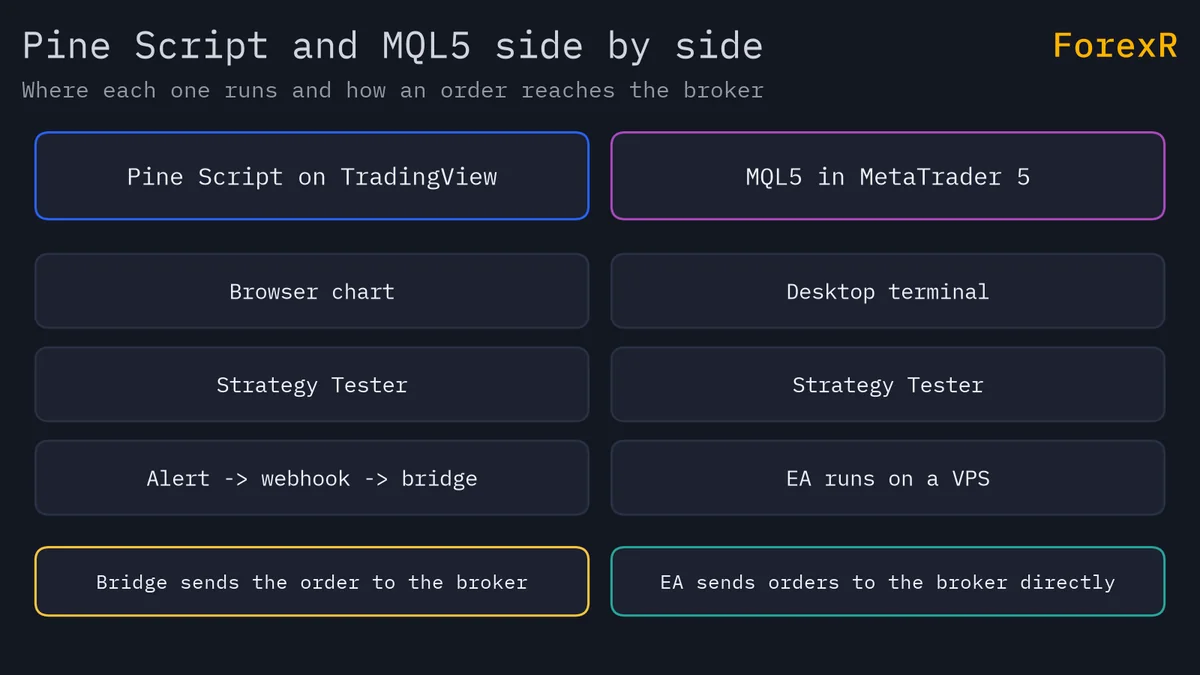
An MQL5 program runs inside the MetaTrader terminal, which is software you install and log in to your broker’s server with. An EA only trades while that terminal is open and connected. That is why traders put it on a VPS, a rented computer that stays on all day. Running an EA 24/7 explains this.
Which Is Better for Backtesting?
Both have a Strategy Tester, and both give you a simulation, not a promise. In TradingView you add a strategy to a chart and read its report. See how to backtest a Pine strategy. In MetaTrader you pick an EA, a symbol, dates and a testing mode in the Strategy Tester window. See how to backtest an EA.
The data differs. TradingView tests on the chart’s own price history. MetaTrader tests on the history your broker’s platform holds or downloads, and it offers different modelling modes, so a result can change with the mode. A result on one platform will not exactly match the other. In both, a test that looks good can fail live, because of costs, slippage, news and curve fitting, which means tuning a strategy until it fits the past.
How Does Automation Work in Each?
This is the biggest difference. An MQL5 Expert Advisor is attached to a chart in MetaTrader. It reads prices, applies its rules and sends orders to your broker from the same program. It can also manage a trade after it opens.
Pine Script cannot send orders to a broker by itself. It can raise an alert, and a separate program can read the alert and place an order. That chain has more parts that can fail, such as delays, missed or doubled alerts, and symbol names that do not match. How to send TradingView alerts to MT4 or MT5 walks through it. If full automation is your goal, MQL is the more direct route. See forex robots and Expert Advisors for the wider picture.
What About Data, Markets and Cost?
TradingView lets you chart many kinds of markets from one place, and a Pine script can run on any symbol you can open. A single script can also request data from other symbols and timeframes, within TradingView’s limits.
MetaTrader trades the instruments your own broker offers. The symbols, the prices and the spreads you see are the broker’s. So an EA tested on one broker’s data may behave differently on another’s. If you trade forex or gold CFDs, check that the symbol names in your code match your broker’s, which often add suffixes.
You can begin with Pine on a free TradingView account, and MetaTrader is usually free to download from a broker. The real cost is time. Pine asks for hours before your first useful script. MQL5 asks for weeks before you trust an EA with live money, because you must test it, watch it on a demo account and fix its mistakes.
Which Is Easier to Learn?
Pine is easier at the start. A working indicator is five lines, and you see it on the chart at once. The language assumes a chart: it runs your code once per bar, so you rarely write loops over time.
MQL5 looks like C++. You write functions that run when a tick arrives, handle orders, check for errors and manage positions. That is more to learn, but it is also what real automation needs. If you have never coded, begin with Pine, then move to MQL5 when you want a robot.
Can You Convert Pine Script to MQL5?
Not automatically. The two languages are built differently, so a Pine script has to be rewritten by hand in MQL5, and the result can behave differently. The idea carries across, such as “buy when the fast average crosses above the slow one”, but the code does not. Check any rewritten version again from scratch. The same goes for scripts and EAs you download. The ForexR Pine strategies and EA library are free directories of open-source code, but ForexR does not test or recommend any of it.
Which Should You Choose?
- Choose Pine Script if you mainly want to see and test ideas on a chart, you are new to coding, or you trade by hand and want alerts.
- Choose MQL5 if you want a robot that opens and closes trades at your broker without you.
- Use both if you like TradingView’s charts but want MetaTrader to execute. Expect extra work to keep the two in agreement.
Pick the library that fits your first project: browse the Pine Script Library for chart tools, or the EA library for robots.
Neither language gives you an edge by itself. Code only does what you tell it, so a poor idea written in either language still loses money. Backtests flatter, and automation can lose quickly when something breaks. Leveraged forex and CFD trading carries a high risk of loss, so test on a demo account and only risk money you can afford to lose.
FAQ
Is Pine Script easier than MQL5?
For most beginners, yes. Pine scripts are short, run in the browser and show a result on the chart straight away. MQL5 is a fuller programming language with more to learn, such as handling orders and errors. If you have never coded, start with Pine and move to MQL5 when you need a robot.
Can Pine Script place trades on a MetaTrader account?
Not directly. Pine can raise an alert, and a separate program can pass that alert to MetaTrader as an order. That chain can add delay, miss alerts or send duplicates, so test it on a demo account first. An MQL5 Expert Advisor trades from inside the terminal without that extra link.
Should I learn Pine Script or MQL5 first?
Learn Pine first if you want to see ideas on a chart quickly or you are new to code. Learn MQL5 first if your goal is an automated robot on MetaTrader. Many traders learn Pine for quick testing, then rewrite the ideas they trust in MQL5.
Do I need a VPS to run an MQL5 Expert Advisor?
Not strictly, but an EA only trades while its MetaTrader terminal is open and connected. If you switch off your computer, it stops. A VPS keeps the terminal running all day, which is why many EA users rent one. A Pine script on a chart needs no VPS.