MT4 vs MT5: Key Differences and Which One to Choose

MT4 vs MT5: the short answer
MetaTrader 4, released in 2005, was built for forex and is the simpler of the two, with a huge library of existing indicators and expert advisors. MetaTrader 5, released in 2010, is a multi-asset platform with more timeframes, more order types, a built-in economic calendar and a much faster strategy tester. If you are starting fresh, MT5 is usually the sensible default; if you depend on a specific MT4 tool, MT4 still does the job.
Both platforms come from the same developer, MetaQuotes, and both are free to download through your broker. MT5 is not simply an update of MT4 — it is a separate program with its own programming language, which is why the two have existed side by side for so long.
The key differences at a glance
- Release and purpose: MT4 — 2005, designed for forex. MT5 — 2010, designed for multiple asset classes.
- Timeframes: MT4 has 9. MT5 has 21, including extras such as 2-minute, 10-minute, 2-hour and 8-hour charts.
- Built-in indicators: MT4 has 30. MT5 has 38.
- Pending order types: MT4 has 4 (buy limit, sell limit, buy stop, sell stop). MT5 has 6, adding buy stop limit and sell stop limit.
- Economic calendar: built into MT5; not part of MT4.
- Depth of market: available in MT5, where the broker supplies the data.
- Strategy tester: single-threaded in MT4; multi-threaded and multi-currency in MT5.
- Programming language: MQL4 for MT4; MQL5, which is object-oriented, for MT5.
- Position accounting: MT4 is hedging only. MT5 supports hedging or netting, depending on how the broker sets up the account.
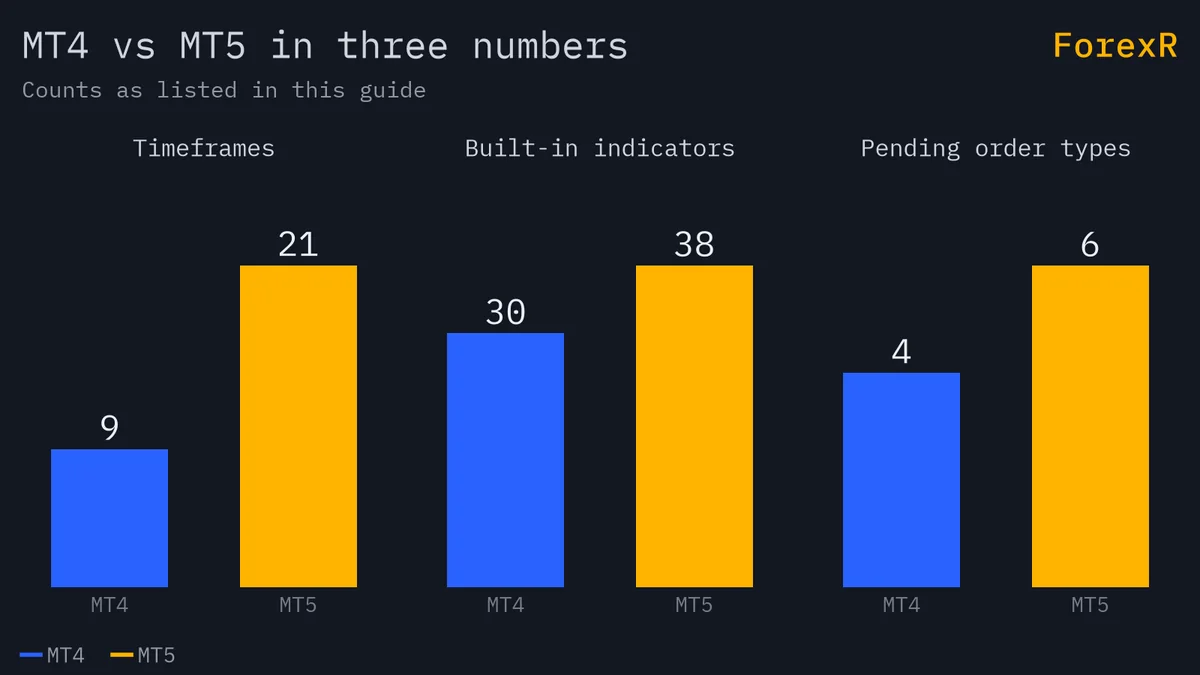
Charts, timeframes and indicators
For everyday chart reading the two platforms feel similar. Both offer candlestick, bar and line charts, drawing tools, templates and custom indicators. MT4’s nine timeframes run from one minute to one month and cover what most traders use: M1, M5, M15, M30, H1, H4, daily, weekly and monthly. MT5’s 21 timeframes fill the gaps, which helps if your method uses something less common, such as a 2-hour or 8-hour chart.
The eight extra built-in indicators in MT5 matter less than they sound, because thousands of custom indicators exist for both platforms. If you are still learning how to read a forex chart, either platform has far more tools than you need. A clean chart with one or two moving averages teaches more than a screen full of oscillators. MT5’s built-in calendar is a convenience rather than a necessity; what matters is knowing how to use an economic calendar in the first place.
Order types, hedging and netting
MT5’s two additional pending orders combine a stop and a limit. A buy stop limit, for example, waits for price to rise to a stop level and then places a buy limit order at a lower price you have chosen, so you can trade a breakout but only on a pullback. They are handy for some strategies, though most beginners will never need them. The basics are covered in lot sizes and order types.

Position accounting is a bigger practical difference. In a hedging account, every trade is a separate ticket, and you can hold a buy and a sell on the same pair at once. In a netting account, all trades in one symbol merge into a single position: buy 0.10 lots of EUR/USD, then buy another 0.10, and you have one 0.20-lot position at the average price; sell 0.05 and it shrinks to 0.15. MT4 is hedging only. MT5 can be either, and the mode is fixed when the broker creates the account, so check before you open one — particularly if you use an expert advisor that manages several separate trades on the same pair.
Strategy tester and automated trading
If you plan to build or test trading robots, this is where MT5 pulls clearly ahead. MT4’s strategy tester is single-threaded and tests one symbol at a time. MT5’s tester is multi-threaded, so it can use all the cores of your processor to run optimisations far faster, and it can test strategies that trade several currency pairs at once.
Faster testing does not make a strategy profitable, and a back-test that looks perfect is often over-fitted to the past. Treat any result as a starting point, then forward-test on a demo account. Our guide to forex robots and expert advisors explains what automated systems can and cannot do, and why promises of effortless income from a robot deserve suspicion.
MQL4 vs MQL5: will your EAs and indicators work?
This is the main reason MT4 has survived. Programs written in MQL4 do not run on MT5 without being rewritten. An MT4 expert advisor file will not load in MT5, and the same goes for custom indicators and scripts. MQL5 is an object-oriented language, and MT5 handles orders and positions differently, so conversion is real programming work rather than a quick file change.
MT4’s library of free and paid tools, built up over two decades, is enormous, and many traders stay for one particular indicator or EA. The MT5 library is also large, and it is where the developer’s own effort now goes. Before choosing, list the tools you truly rely on and check that an MT5 version exists. If you use none, compatibility is not a reason to pick MT4.
Before you download an EA, check which platform it was written for. The EA Library shows MT4, MT5 or both on every EA, and lets you filter by platform.
Mobile and web versions
Both platforms have desktop, web and mobile versions, with apps for iOS and Android. The mobile apps cover the essentials: live quotes, charts with built-in indicators, order placement and account history. They do not run expert advisors or custom indicators — automated trading needs the desktop terminal, usually left running on a computer or a virtual private server. The web terminal is useful when you cannot install software.
The desktop terminals are Windows programs first and foremost. Options for Mac users exist but vary, so check what your broker provides. A sensible routine is to analyse and plan on desktop, and use mobile mainly to monitor and manage open trades.
Who should pick which?
- Choose MT5 if you are new and have no existing tools, you want to back-test or optimise strategies seriously, you want the extra timeframes or the built-in calendar, or you plan to trade other markets such as shares or futures with the same broker.
- Choose MT4 if you rely on a specific MT4-only expert advisor or indicator, your preferred broker or account type only offers MT4, or you follow a course or community that is built around it.
MetaQuotes focuses its development on MT5, so new features arrive there and MT4 changes little. Learning MT5 first is the more future-proof choice, and moving from one to the other later is easy, since the layout and workflow are closely related.
Your broker’s conditions matter more than the platform
The platform is only a window on to your broker’s prices. Spreads, commissions, swap rates, execution speed, slippage, available leverage and the instruments offered are all set by the broker, not by MetaTrader. The same broker may even offer different conditions on its MT4 and MT5 accounts.
So choose the broker first, on regulation and total cost, and the platform second. The guide on how to choose a forex broker explains the checks, and you can compare platforms and conditions on the independent broker comparison page. Whichever you pick, learn it on a forex demo account before trading live. Neither platform reduces the risk of trading: forex and CFDs carry a high risk of loss, so only risk money you can afford to lose.
FAQ
Is MT5 better than MT4 for beginners?
For most beginners starting from scratch, MT5 is the better default. It has more timeframes, a built-in economic calendar and is where the developer focuses its work. MT4 is slightly simpler and perfectly adequate for manual forex trading. The layouts are so similar that skills learned on one transfer easily to the other.
Can I use MT4 expert advisors on MT5?
No. Expert advisors, indicators and scripts written in MQL4 do not run on MT5, because MT5 uses the MQL5 language and handles orders and positions differently. The code has to be rewritten. Many popular tools have separate MT5 versions, so check with the developer before switching platforms.
Does MT5 allow hedging?
Yes, if your broker sets the account up in hedging mode. MT5 supports two position accounting systems: hedging, where each trade is a separate position and opposite trades can coexist, and netting, where trades in one symbol merge into a single position. MT4 only offers hedging. Confirm the mode with your broker before opening an account.
Is MT4 being discontinued?
MetaQuotes concentrates its development on MT5, and MT4 now changes very little. However, MT4 remains widely offered by brokers and heavily used by traders, largely because of its vast library of existing expert advisors and indicators. If you are starting fresh, MT5 is the more future-proof choice, but MT4 still works.