Pine Script v4, v5 and v6: What the Version Line Means

What Does the Pine Script Version Line Mean?
The line //@version=6 at the top of a script tells TradingView which version of Pine Script the code was written for. Version 6 is the newest, and versions 5 and 4 still appear in many older scripts. Each version has its own rules and names, so a script written for one version can show errors in another.
Why do versions exist at all? TradingView adds features and fixes awkward rules over time. A change that would break old scripts cannot be made quietly, so each version is a separate set of rules, and your script says which set it follows. That way an old script keeps working while new scripts get the improvements.
You met this line in What Is Pine Script?. This guide explains why the versions differ, what changed between them, and how to handle an older script.
How Do You Tell Which Version a Script Uses?
Look at the first line of the code. A version 4 script starts with //@version=4, a version 5 script with //@version=5, and so on. The line is a compiler annotation, a note that the editor reads before it reads the code.
- Quick clues for v4: the declaration is
study(), and indicators such assma()andrsi()have nota.in front. - Quick clues for v5 and v6: the declaration is
indicator()orstrategy(), and calls look liketa.sma()andinput.int(). - No line at all: TradingView’s documentation says version 1 is assumed when the annotation is missing. That is far older than any script in the library, so a missing line usually means a partial copy.
On the ForexR Pine Script Library, every script page shows its version in the kicker line and in a stat box, so you can check before you paste.
What Changed From Version 4 to Version 5?
The biggest change was namespaces, which are prefixes that group related functions. Version 5 put built-in functions into named groups so the language is easier to read and to extend:
- ta. for technical analysis:
sma()becameta.sma(). - math. for maths:
abs()becamemath.abs(). - request. for outside data:
security()becamerequest.security(). - str. for text:
tostring()becamestr.tostring().
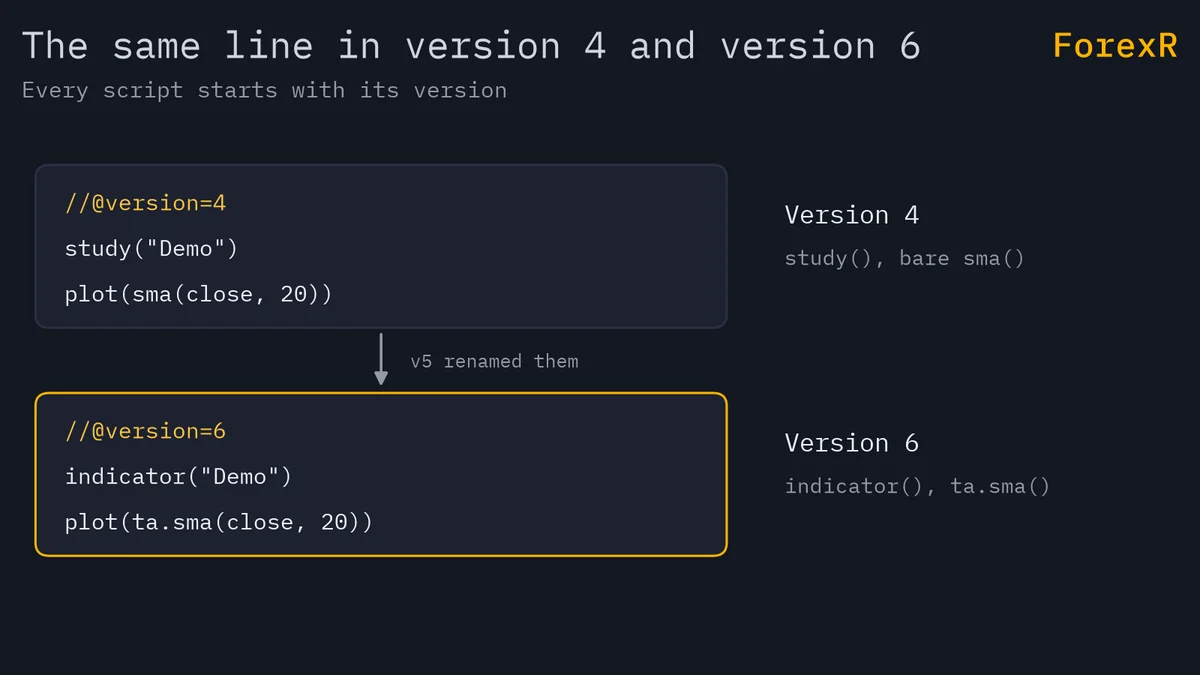
Other changes you will notice in old code:
- study() became indicator(). The job is the same: it declares an indicator.
- One input() became many. Version 5 added
input.int(),input.float(),input.bool(),input.string(),input.color(),input.timeframe()and others, one for each type of setting. - iff() and offset() were removed. You use the
?:operator and the[]history operator instead. - transp was replaced. Transparency now lives inside the colour, with
color.new(). - strategy.exit() must do something. It needs at least one exit level, such as a stop or a limit.
Here is the same moving average in both styles:
//@version=4
study("SMA", overlay=true)
len = input(20, minval=1)
plot(sma(close, len))
And in version 6:
//@version=6
indicator("SMA", overlay=true)
len = input.int(20, minval=1)
plot(ta.sma(close, len))
What Changed From Version 5 to Version 6?
Version 6 tightened rules that version 5 left loose. According to TradingView’s migration guide, the main changes are these:
- Numbers are no longer true or false. An int or float is not silently turned into a bool. If you want that, write
bool(x). - A bool can no longer be na.
nameans “no value”. A bool now always holds true or false, and conditions that used to give na give false. - and and or are lazy. The second part is evaluated only if it is needed. This lets you write a check such as “the array has items and the first item is above 10” in one line.
- Dynamic requests are on by default. In version 5 you had to switch them on. They let
request.*()calls take values that change from bar to bar. - The when argument is gone from the
strategy.*()order functions. You use anifblock. - Default margin changed. The default
margin_longandmargin_shortare now 100, where they were 0. - Division changed. Dividing two ints that do not divide evenly now gives a fraction. Wrap the result in
int()if you need a whole number.
The when change in practice looks like this. Version 5:
strategy.entry("Long", strategy.long, when=ta.crossover(fast, slow))Version 6:
if ta.crossover(fast, slow)
    strategy.entry("Long", strategy.long)
The margin change matters most for backtests. A strategy converted to version 6 can behave differently on the same chart, because of the new margin default and a change in strategy.exit(): when you give an exit level in two forms, such as a distance in ticks (profit) and a price (limit), version 6 uses whichever level price is expected to reach first. Always compare the converted version with the original, as how to backtest a Pine strategy advises.
How Do You Convert a Script to a Newer Version?
The Pine Editor has a converter. For version 5 to 6, open the editor’s “Manage script” menu and choose “Convert code to v6”. The converter only works if the version 5 code compiles. Even then, TradingView says some scripts need manual fixes afterwards.
For version 4, TradingView says the editor can convert indicators and strategies to version 5 automatically, but not every script converts. If it fails, you fix the errors by hand. Move one version at a time: 4 to 5, then 5 to 6.
Do not just change the number on the first line. The code inside follows the old rules, so the number and the code no longer match, and you get errors. The errors are explained in Pine Script errors and limits.
Which Version Should You Use?
- Writing a new script: use version 6. It is the current one and gets the new features.
- Using someone else’s script: leave its version alone. If it runs and you understand it, you do not need to convert it.
- Following an old tutorial: check its version line. Most tutorials for version 4 need the changes above before they run in version 6.
- Combining scripts: a script can only import a library by naming its version. Keep the pieces in the same version where you can.
How Does the ForexR Library Handle Versions?
The library lists scripts for versions 4, 5 and 6. Version 5 and version 6 each make up about four in ten scripts, and version 4 is under two in ten. You can filter by version with the chips on the list page, or open the version 6 scripts or version 5 scripts directly. A newer version is not proof that a script is better, and the library does not test any of them. A version 4 script can be well made, and a version 6 script can repaint.
Next, try the first indicator guide in version 6, and see how to add a Pine Script to TradingView for the paste steps. A converted script is still only a chart tool. It describes the past, backtests flatter, and leveraged forex and CFD trading carries a high risk of loss, so only risk money you can afford to lose.
FAQ
Can I run a Pine Script v4 script in TradingView today?
Usually yes. TradingView still compiles older versions, so you can paste a version 4 script as it is and keep its version line unchanged. If you want to edit it with newer features, convert it step by step, version 4 to 5 and then 5 to 6, and fix any errors.
What happens if I change //@version=5 to //@version=6 by hand?
The editor will probably show errors, because the code below still follows version 5 rules. Changes such as the removed when argument and stricter bool handling need real edits. Use the Manage script menu’s convert option instead, then fix what it leaves and compare results.
Why does my old Pine Script show an undeclared identifier error?
A version 4 script calls functions like sma() or study() with no prefix, which version 5 and 6 no longer accept. Either keep the version 4 line so TradingView reads it as version 4, or convert it. Also check you copied the whole script.
Is Pine Script version 6 better than version 5?
Version 6 is newer, stricter and the one TradingView builds on, so it suits new scripts. That does not make a version 6 script more profitable or less likely to repaint. Judge a script by its logic, its risk notes and your own tests, not by its version number.