What Is MCP? The Model Context Protocol for Traders

What Is the Model Context Protocol (MCP)?
The Model Context Protocol (MCP) is an open standard released by a major AI company in late 2024. It gives an AI assistant one common way to call outside tools and read outside data through small programs called MCP servers. For traders, that means a chatbot can finally see live prices or your own trade journal instead of guessing.
MCP has been adopted across the AI industry since its release. Before it existed, every connection between a chatbot and an outside system was a custom, one-off build. MCP replaces those one-offs with a shared standard, the way one plug shape lets many different appliances use the same socket.
Why Did AI Assistants Need a Standard Like MCP?
A large language model (LLM), the technology behind modern AI chatbots, learns from a fixed snapshot of text. On its own it cannot see today's prices, your open positions or your trading history, and it will often answer confidently anyway. Our guide to AI in forex trading explains in depth why that gap makes a raw chatbot unsafe for live trading decisions.
MCP narrows the gap in a controlled way. Instead of the model guessing what a currency pair did today, the assistant asks a server, the server asks a real data source, and the answer comes back as fresh numbers. The model still writes the words, but the facts arrive from outside. If you already use a chatbot for study and research, our safe chatbot workflow pairs naturally with everything that follows.
How Does MCP Work? Hosts, Clients and Servers
The names sound technical, but only three pieces do the work:
- Host application: the AI app you actually type into. It runs the conversation and decides when outside help is needed.
- Client: the part inside the host that speaks the protocol on the app's behalf. You never touch it directly.
- Server: a small separate program that offers specific abilities, such as fetching a quote or reading a file. A server can run on your own computer next to the app, or remotely over HTTP, the same transport ordinary websites use.
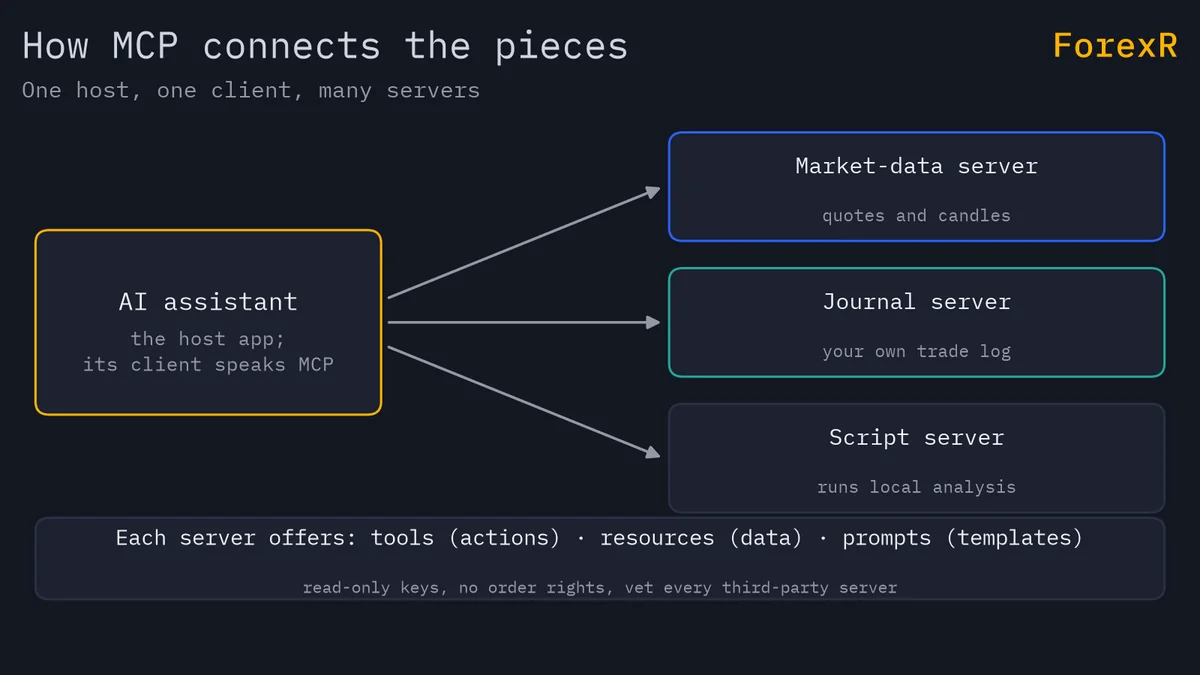
Messages between client and server use JSON-RPC, a plain format where each request and reply is a small block of structured text. You will rarely read it yourself, but the openness matters: anyone can write a server, and open-source servers already exist for databases, spreadsheets, code, web search and market data.
Tools, Resources and Prompts in Plain Words
Every MCP server exposes up to three kinds of things, and the names are worth learning because they set the level of risk:
- Tools: actions the model may call, such as “fetch the latest candles” or “run this query”. Tools do things, so they carry the most risk.
- Resources: data the model may read, such as a price file or your journal database. Reading is safer than acting, though bad data still leads to bad answers.
- Prompts: reusable instructions stored on the server, such as a standard “review my trading week” template you can trigger on demand.
What Can a Trader Actually Do With MCP?
Used carefully, MCP turns a general assistant into a research desk that reads your real numbers. Sensible uses include:
- Live market data: pipe current quotes or candles into the conversation, so a question about EUR/USD is answered from the live number rather than from memory.
- Journal queries: let the assistant read your own trade log and answer questions about your history. A well-kept trading journal becomes far more useful once you can question it in plain English.
- Read-only account data: some brokers offer an API, a doorway that lets other software read your account. With a read-only key, an assistant can summarise your open positions and exposure on request. If you are still deciding where to trade, compare regulated brokers first.
- Local analysis scripts: have the assistant run a script you wrote, on your machine, and explain the output. ForexR's own analysis pages follow the same principle at site scale: levels are computed in code from live market data first, and the words are written from those numbers.
A Worked Example: Questioning Your Own Journal
Say your journal holds 200 closed trades. You ask, “What is my average result on GBP/JPY trades opened after 21:00?” Without MCP, a chatbot would invent a plausible-sounding answer, because it has no access to your file. With a journal server connected, the assistant calls a query tool, the server returns the real rows, say 20 trades with an average loss of $12, and the reply is built from those numbers.
You can then check the claim yourself, because those 20 trades exist in your own file. That is the practical difference MCP makes: answers become checkable. Note what has not changed, though. The assistant is not predicting anything; it is doing arithmetic on data you gave it, and if your journal is messy the answers will be messy too.
Is MCP a Trading Robot?
No. An expert advisor (EA) is a program that executes trades by itself inside MT4 or MT5; our guide to forex robots covers how those work and where they fail. MCP is only a connection standard: it lets an assistant read data and call tools you approve. It has no built-in strategy, no execution engine and no place in your order flow.
Could someone wire an assistant up to place trades through a write-capable server? Technically yes, and you should not do it. A language model can misread an instruction, and one wrong tool call with trading rights is a real order with real money. If automation is your goal, build and test a rule-based system properly instead; our bot-building guide shows the honest path.
MCP Security Risks Every Trader Should Know
MCP's openness is its strength and its weak point. Anyone can publish a server, quality and safety vary widely, and two attack patterns matter most:
- Prompt injection: hidden instructions smuggled into data the model reads. A poisoned web page or document can tell the assistant to ignore your rules, and the model may obey, because it cannot always tell data apart from commands.
- Tool poisoning: a malicious or compromised server that feeds the model false data or harmful instructions through its tool descriptions or its replies.
A trader is a valuable target, because trading accounts hold money. Treat every third-party MCP server exactly like software you are about to install, because that is what it is: check who wrote it, read the source on GitHub when it is open, check the licence, and favour servers you can run locally over remote ones you cannot inspect.
Safety Rules Before You Connect Anything
- Read-only keys only. If a broker key can place orders or move funds, do not give it to an assistant. A read-only key caps the damage any mistake can do.
- Never grant execution or withdrawals. Anything write-capable multiplies the blast radius of a model error, so order placement and money movement stay off the table.
- Vet every server. Unknown author, closed code and a remote host is three warnings in one package.
- Verify outputs. Cross-check any number that would change a decision against your own platform before you act on it.
- Start small and local. A local quote server risks little; connect anything sensitive only after the setup has earned your trust.
MCP gives an AI assistant better inputs, not foresight. Connected to every data feed on earth, a model still cannot know tomorrow's price, and a clean MCP setup cannot turn a weak strategy into a strong one. Leveraged forex and CFD trading carries a high risk of loss, ESMA-era disclosures show 74-89% of retail CFD accounts lose money, and you should only ever risk money you can afford to lose.
FAQ
Do I need to know how to code to use MCP?
Not always. Many host applications let you add ready-made MCP servers through a settings screen, with no code. You will need some technical comfort to install and configure them, and writing your own server requires programming. Whatever you connect, treat a third-party server like software you are installing: check the author, the source and the permissions before you trust it.
Is it safe to connect an AI assistant to my broker account?
Only with strict limits. Use a read-only API key, so the assistant can see balances and positions but can never place orders or move money. Never grant trading or withdrawal permissions, because one misread instruction could become a real order. If your broker offers no read-only option, do not connect the account at all; copy numbers across manually instead.
Does MCP make an AI assistant better at predicting the market?
No. MCP improves the assistant's inputs, not its foresight. With live data connected, its answers describe the present accurately instead of guessing, which is genuinely useful for research and journal review. But no data feed reveals tomorrow's price, and a model with perfect information can still be wrong about what happens next. Treat MCP as plumbing for facts, not a source of predictions.
What is the difference between MCP and a normal API?
An API is one service's private doorway, and every chatbot integration used to need custom code for each one. MCP is a shared standard on top: a server wraps a service once, and any MCP-capable assistant can then use it. Think of an API as a country's own plug socket and MCP as the universal travel adapter that fits them all.