Pine Script Functions, Methods and Libraries: Reuse Your Code

How Do You Reuse Code in Pine Script?
You write a function once and call it wherever you need it. A function is a named block of code that takes inputs, called parameters, and gives back a result. If several scripts need the same function, you move it into a library, a special script that other scripts import. This guide shows each step.
It builds on how Pine Script runs on every bar, so read that first if “series” is a new word. For the three script types, see indicators, strategies and libraries.
How Do You Write a Function in Pine Script?
TradingView’s documentation describes two shapes. A single-line function keeps the header and body on one line, and the last expression is the result. A multi-line function puts the body on the next lines, indented by four spaces, and its last expression is the result.
add(a, b) => a + b

zScore(float source, int length) =>
    float mean = ta.sma(source, length)
    float sd = ta.stdev(source, length)
    (source - mean) / sd
The second function measures how many standard deviations a price sits from its average. A standard deviation is a typical size of the gap between prices and their average. If the mean is 100, the deviation is 5 and the source is 110, the result is (110 − 100) / 5 = 2.
What Are Parameters, Types and Return Values?
- Types: words such as
int,floatandstringbefore a parameter name limit what the caller may pass. They are optional in most plain functions, but they make code easier to read. - Defaults: a parameter with a default value, such as
length = 14, becomes optional in a call. - Return value: whatever the last expression in the body gives. To return several values, end with a tuple in square brackets and catch it with a matching tuple on the left of the call.
The documentation says a type keyword is required if a default is na, if you use a qualifier, if the function is exported, or if the parameter is the first one of a method. A qualifier such as simple or series says when a value must be known and whether it can change from bar to bar.
What Can a Function Not Do?
Pine functions have firm limits. These come from the documentation:
- No nesting: you cannot define a function inside another function, a loop or an
ifblock. - No recursion: a function cannot call itself. Use a loop instead.
- No changing outside values: a function cannot reassign global variables or its own parameters.
- No plots inside:
indicator(),plot(),plotshape()andbgcolor()must be called in the global scope, not in a function body.
Drawing functions such as line.new() are not on that list, so a function can create drawings. The drawings guide covers them.
What Is a Method in Pine Script?
A method is a function you call with dot notation, so the value sits in front of the name. You declare it with the method keyword, and the first parameter, which receives the value before the dot, must have an explicit type. x.pctFrom(y) does the same job as pctFrom(x, y).
//@version=6
indicator("Function and method demo")
length = input.int(20, "Length", minval = 2)

bandEdges(float source, int len, float mult) =>
    float mid = ta.sma(source, len)
    float dev = mult * ta.stdev(source, len)
    [mid + dev, mid - dev]

method pctFrom(float this, float base) =>
    (this - base) / base * 100

[upper, lower] = bandEdges(close, length, 2.0)
plot(upper, "Upper edge")
plot(lower, "Lower edge")
plot(close.pctFrom(open), "Close vs open, %", color.orange)
The script is in its own pane because it has no overlay = true, and the percent line sits on a different scale from the edges. That is fine for a demo. Methods can also work on arrays and other collection types, and a method can share a name with a built-in one, so choose names that cannot be confused.
What Is a Pine Script Library, and How Do You Write One?
A library starts with library() in place of indicator() or strategy(). It draws nothing. It holds functions marked with export, so other scripts can use them. Every parameter of an exported function needs an explicit type.
//@version=6
library("MyTools")

//@function Percentage change from a to b.
//@param a The starting price.
//@param b The ending price.
//@returns The change as a percentage of a.
export pctChange(float a, float b) =>
    (b - a) / a * 100
The lines that begin with //@ are compiler annotations. They are optional, but TradingView shows them as hints in the Pine Editor when you hover over the function name. Exported functions have their own rules: they cannot read global variables unless those are constants, and they cannot call any input.*() function. A type that your exported functions accept or return, such as one you define yourself, must be exported too.
How Do You Import a Library?
A library must be published before another script can import it. Publishing is covered in how to publish a Pine Script. A library can be private or public. Then you add an import line near the top of the importing script.
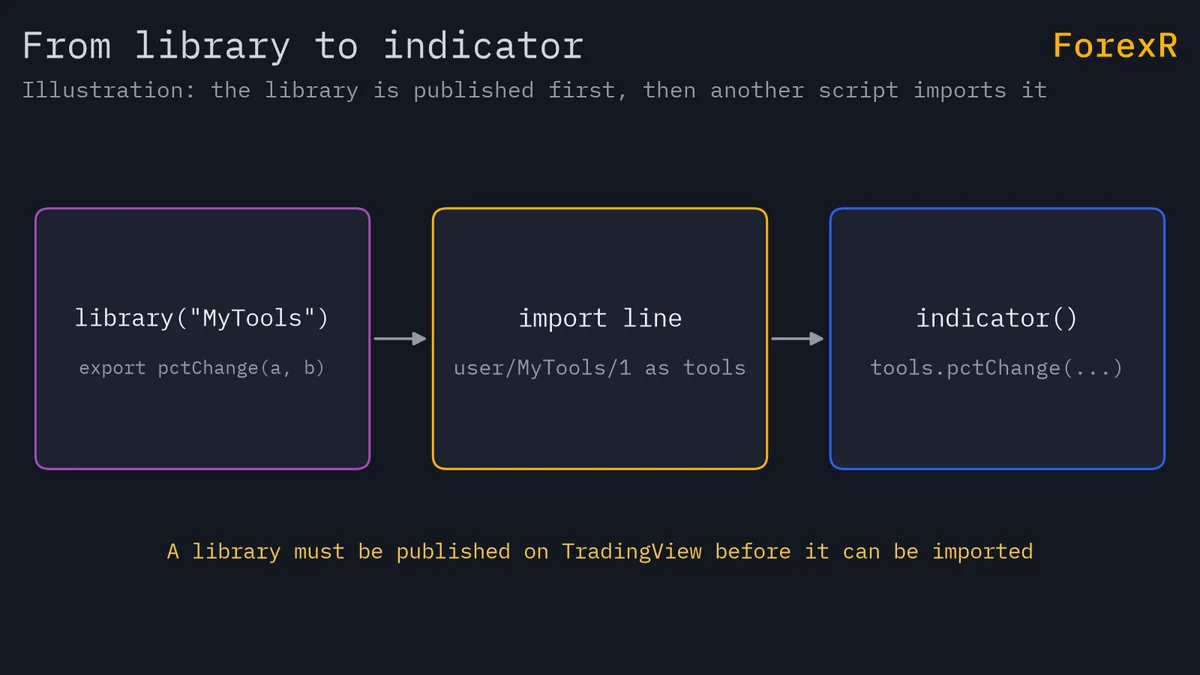
import yourname/MyTools/1 as tools
plot(tools.pctChange(open, close))
The three parts are the author’s username, the library name and a version number. The version is always explicit. The documentation says there is no way to use the latest version automatically, so you update the number yourself after each release. The as part is an optional alias; without it, the library name becomes the prefix. The names here are placeholders: the line only works once a library with that author, name and version exists.
When Is a Library Worth Writing?
- Worth it: you copy the same helper into three or more scripts, or you want one tested version of a calculation that all your scripts share.
- Not worth it: the helper is five lines used once. A plain function in the script is simpler, and the reader sees everything in one file.
- A trade-off: an imported library is code you do not see in the script. If its author publishes a new version, your import still points at the old one until you change the number, which keeps results stable but means you must update on purpose.
The documentation does not state a cap on the number of exports. It does state that the compiled tokens, a measure of script size, are limited to 100,256 per script and 1,000,000 across all imported libraries.
How Does the ForexR Pine Library List Libraries?
The libraries category page shows the library-type scripts in the Pine Script Library, which is a small share of the whole directory. A GitHub copy of a library is mainly for reading and learning: TradingView resolves an import from a published script by username, name and version, so a file pasted from GitHub does nothing for other scripts until you publish it on your own account. ForexR does not test any library. Read the code, check its licence, and test it before you rely on it. How to use the Pine library explains the page layout.
A function or library can hide a mistake as easily as it removes one. A bug in a shared helper breaks every script that imports it, and a good-looking indicator still describes only the past. Leveraged forex and CFD trading carries a high risk of loss, so only risk money you can afford to lose.
FAQ
Can a Pine Script function call itself?
No. The documentation says a user-defined function cannot call itself, so recursion is not allowed. When you need repeated work, such as finding a greatest common divisor, write a loop inside the function instead. Functions also cannot be defined inside loops, conditions or other functions.
Do I have to publish a library before I can import it?
Yes. The library must be published first, either privately or publicly, and the importing script then refers to it by username, library name and version number. Libraries are always open source. A public library can only be imported by open-source scripts, while private scripts can import public or private ones.
What is the difference between a function and a method in Pine Script?
They do the same kind of work. A function takes all its inputs in brackets. A method is declared with the method keyword and called with dot notation, so the first input sits before the dot. Methods are handy for arrays and other collections, and for making code read like a sentence.
Why does my imported library not update?
Because the import line names a fixed version. The documentation says there is no way to use the latest version automatically. When the author publishes a new release, change the version number at the end of the import path yourself, then check that your script still behaves the same way.